Friday, October 31, 2008

Devoxx advertising

As I am going to talk at Devoxx, I will also help to promote the conference by putting a banner online:


Click on it to get to the registration page
Thursday, October 30, 2008

Clustering work in RHQ and Jopr

My colleague Joseph recently wrote about cluster management in upcoming RHQ 1.2. Don't confuse this with the cluster work we have done for RHQ 1.1, where we added the clustering of the RHQ server itself.
The goal in RHQ 1.2 is to be able to cluster resources together and operate on them. You will probably say that this is already possible with compatible groups. But this is only half of the truth. Go and read Joe's posting.

In addition to the RHQ side, we will also work on clustering JBoss AS servers in the Jopr project. I have set up an initial requirements document for this. I am looking forward to your comments on this.

Managing a cluster of JBossAS servers includes a big part of managing JBoss Cache instances and their underlying JGroups infrastructure.

I've started a JBoss Cache plugin for Jopr some time ago. If you are interested, check it out and use it in RHQ / Jopr and Embedded Jopr.

Wednesday, October 22, 2008

Red Hat News | Project Jopr: JBoss Operations Network Now Open Source

After we released Jopr last week and even had an announcement on TheServerSide (My first posting there!), there is now an official Red Hat press release:

Red Hat News | Project Jopr: JBoss Operations Network Now Open Source.

Cool!

And btw.: I even added a first 'draft' of a JBoss Cache plugin to Jopr since then.

Tuesday, October 21, 2008

Qype - where is the content?

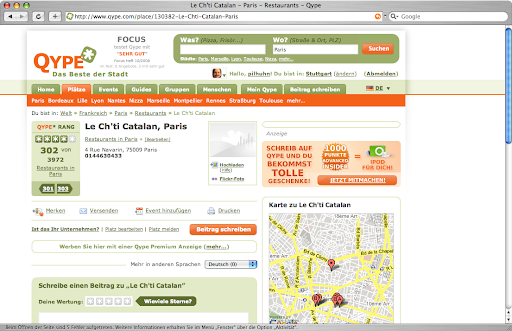
I am a heavy user of Qype and have already contributed quite a lot, but recently the site is overloaded. And worse: you don't even find the content anymore:

Screenshot_3.png
(Click for a larger image)


You can see that the place has 4 stars on average. You can see that you can win something, you have a place to comment, you can book an ad for this place but where is the content, that made up the 4 stars?

Well, the solution is here:

Bild 1.png


There is only content in French, so it is hidden from me - and only when I open that popup, I will see that there is actually content. This sucks!

And for my 1280x800 display, this page is just too full. The page layout has been a lot better in the past.

Thursday, October 16, 2008

Jopr - JBoss Operations Network 2 goes open source too

You have heard about JBoss Operations Network 2?
Then you probably also know that RHQ is its upstream project (like in the Fedora / Red Hat Enterprise Linux case).

Jopr


If you had a look at JBoss ON 2, you have surely also seen that RHQ does not have all the features, JBoss ON 2 has (namely monitoring and management of JBossAS was missing).

This hole has now been closed by Jopr. Jopr closes the gap between RHQ and JBoss ON 2, builts on RHQ as its infrastructure framework and serves as open source upstream for JBoss ON 2

You can find it at http://www.jboss.org/jopr/.

Forums are also available for Jopr

Embedded Jopr


Next to Jopr we have another thing coming for you: Embedded Jopr. This is a new management console for JBossAS instances that shares parts of the underlying infrastructure and plugins with RHQ and Jopr. You can deploy and use it on JBoss AS 4.2.x, as described on the install page.

Embedded Jopr has its home page at https://www.jboss.org/embjopr/.

Forums for Embedded Jopr also live on jboss.org

Join us ...


The Jopr team has registered #jopr on irc.freenode.net, so come an join us there (as well as on #rhq on the same server network).

Tuesday, October 14, 2008

Fady talking about RHQ and JBossON @ Gitex in Dubai

My colleague Fady Matar will give a talk about SOA and JBoss ON at Gitex conference in Dubai.

You can find out more about his talk on his blog.

Saturday, October 11, 2008

1.1.0 Release - RHQ-Project

RHQ 1.1.0 has been released!

My colleague Joseph Marques has written a summary article about the contents and scope of this release:

1.1.0 Release - RHQ-Project


As you already know RHQ is also the upstream for JBoss ON 2, so you can expect more in the following days (especially as the availability of JBoss ON 2.1 has been announced for this month already).

Joseph lists major improvements in his article, one being support for Java 6. So this actually means that you can now run a fully open source Java Management and Monitoring system:
And of course you can get support for this whole stack from your preferred Open Source company: Red Hat !


Thursday, October 09, 2008

RHQ 1.1 has been tagged GA -- and brings High Availability

The RHQ code base has been tagged with the GA (General Availability) tag for release 1.1 and brings a lot of new features and improvements. Most notably this includes High Availability (HA) for the servers.

What does this HA mean? Well, you can now have multiple servers in a server cloud that handle incoming agent connections. If one of the servers fails or is put into maintenance mode, the agent will transparently fail over to another server in the cloud.

Setup of HA is also quite easy: just upgrade to RHQ 1.1 and it comes for free. When you add a 2nd server and have it point to the same back end database, it will automatically join the server cloud.

You need to pay attention to two things though:

  • All hosts for agents and servers need to have valid forward and reverse mappings in RHQ 1.1 -- even if you don't use HA
  • If you are using more than one server, you obviously need to increase the allowed connections on your database.

And as always: make sure that the clocks of the involved machines are in sync (e.g. by using ntp).

Watch out for more upcoming posts about RHQ 1.1 and JBoss ON 2.1, which was announced for this october too.

Wednesday, October 08, 2008

Upcoming speaking engagements (updated)

If you want to get the latest news on RHQ and JBoss ON 2, join me on the following dates:


I am looking forward to meet as many of you as possible.

Monday, September 22, 2008

PMD rule to check for unguarded log.debug() and install in Eclipse

Lately I've written a PMD rule to check that calls to log.debug() are guarded by some if (log.isDebugEnabled()) guard.

Adding it to the PMD commandline is relatively easy. Put the class in a jar and put it on the classpath:

snert:/devel/tools/pmd-4.2.3 hrupp$ java -cp \

  lib/pmd-4.2.3.jar:lib/jaxen-1.1.1.jar:lib/junit-4.4.jar:\

  lib/asm-3.1.jar:lib/my.jar \

  net.sourceforge.pmd.PMD /source/to/check text \

  ~/Documents/workspace/PMDRule/ruleset.xml


my.jar contains the classes and ruleset.xml the description for this ruleset

Now with Eclipse, things are a bit more complicated. There is a GUI to basically write
the ruleset.xml in the preferences, but how to add the rule class? I am sure, this can be
done via a Feature Extension, but I didn't find a description quickly.

So here is what I did:


  1. Shut down eclipse

  2. Locate the PMD core plugin in eclipse/plugins (e.g. net.sourceforge.pmd.core_4.2.1.v200804111600)

  3. Copy the rules jar (my.jar from above) to lib/

  4. Edit plugin.xml and add an entry for the jar:
          <library name="lib/commons-logging-1.1.1.jar">
    <export name="*"/>
    </library>
    <library name="lib/my.jar">
    <export name="*"/>
    </library>

    </runtime>


  5. Start eclipse with option -clean


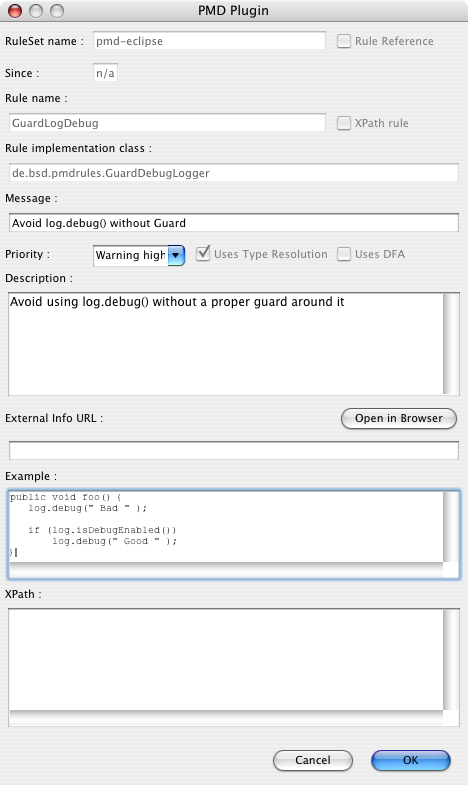
  6. Now go to the Preferences to the PMD->Rules Configuration section, click 'Add rule...' and add an entry for our new rule:
    pmd_rule.png


  7. Start chasing bogus log.debug() usages :-)

This rule is not yet perfect, as it lacks proper type checking for the 'log' variable. It will probably also fail for Statements like "if (cond1 && log.isDebugEnabled())".

You can find the code here.

Please let me know when you have solved the type checking or how to better integrate it with Eclipse.

Wednesday, September 17, 2008

Upcoming talk: JBoss Clustering and Monitoring-Suite in Zürich

Bela Ban and myself will give presentations at theJUGS Event 11.11.08: Jboss Clustering and Monitoring-Suite:

Bela will talk about Tips and tricks to get better performance out of JBoss Clustering

And I will talk about JBossON Management platform and RHQ, its open source upstream

You can find the complete description at the page of the Java User Group Switzerland, where you can also register for the event.

Tuesday, September 16, 2008

RHQ commits mailing list (updated)

We finally made it possible to track SVN commits from RHQ in a mailing list.
I know that many of us like this a lot, even if the view-svn function also allows easy browsing.

You can find the new list on Sourceforge mailinglists, where you can subscribe yourself or
also view the archive (which is pretty much empty while I am writing this post).

Update:

When I first wrote this post, messages were flowing but had no content. This is fixed now.

Monday, September 15, 2008

RHQ: decomposing plugins

I've been talking a lot lately about how to write plugins for RHQ / JBossON.
When you try to manage larger systems like the JBoss Application Server with all its subsystems like Cache, Transactions, JBossWeb etc. your plugin might get relatively large to support all this.
In this posting I will show you how to decompose a large(r) plugin into smaller ones that all together allow you to manage the large(r) system.

This decomposition not only allows you to more easily distribute the development load, but also enables re-use of the parts that have been broken out of the big chunk. The price you have to pay is relatively small and consists mostly of some additional directories and a maven pom.xml file (that I am not going to show here).

The basic trick is to use <depends> and <runs-inside> tags in your plugin descriptor (rhq-plugin.xml) for this new plugin:


<plugin name="JBossCache" ... >
<depends plugin="JMX" />
<depends plugin="JBossAS" useClasses="true"/>


So we need the JMX plugin and the JBossAS plugin (currently part of JBoss ON only) being deployed before our plugin can start. The attribute useClasses means that the classloader of our plugin gets access to the classes of the other plugin (JBossAs here). So we can use those classes too.


<service name="JBoss Cache" ...>


As you know from previous posts, a service can't just "hang in the air" - it needs another server or service as a container. This is where runs-inside comes into play:


<runs-inside>
<parent-resource-type name="JBossAS Server" plugin="JBossAS"/>
</runs-inside>

So our plugin service "JBoss Cache" will be contained in resources of type "JBossAS Server" that come from the JBossAS plugin (that we declared in the depends element earlier).

Apart from this little magic in the plugin descriptor, there is no more additional work to do.

Voilà, RHQ plugins à la carte ... :-)


Monday, September 08, 2008

OOO 3.0 RC1 is out - and does not longer immediately crash on Mac

Open Office released the first release candidate of OOO 3.0.

And opposed to the previous betas, it doesn't immediately crash on my mac (Tiger). Well, this sounds too bad, actually, I did not run it for too long and in this time it did not crash at all.
This does not necessarily mean that it is stable, but the previous versions did crash after that time.

UPDATE: I am just editing a 25 pages document without any issues, so it is really usable now.

I am really looking forward to a final version now.

Wednesday, September 03, 2008

Driving a digital thermometer with RHQ (Part 2)

After we have installed all prerequisites last time, we can now concentrate on the RHQ plugin itself.

temp_chart.png


I won't explain every little bit and will concentrate mostly on the hardware side. If you want to know more about plugin development, go to the RHQ plugin community pages and make sure to check out my RHQ plugin development series.

Plugin architecture


The following picture shows the (hardware) components involved:
onewire-arch.png

The DS9490 is the USB-1-wire adapter used. It has internally a DS1990 compatible uuid chip, that provides a unique id for the adapter. On the bus we have a DS1820 compatible thermometer and can have other 1-wire chips (future).

So our plugin will follow this hardware setup. For the DS9490 we will have a OneWireAdapterComponent + -Discovery and a separate component for the DS1820 plus its discovery component.

Plugin artifacts


Lets have a look at the individual artifacts of the plugin. I will not show everything in great detail -- check out the full source (see below).

Plugin descriptor


 <server name="OneWireAdapter"
description="A single OneWire(r) adapter hosting many devices"
discovery="OneWireAdapterDiscovery"
class="OneWireAdapterComponent">
 
<plugin-configuration>
<c:simple-property name="type"
displayName="Adapter type" required="true"
default="DS9490"/>
<c:simple-property name="port"
displayName="Adapter port" required="true"
default="USB1"/>
</plugin-configuration>

So we have a Server per USB adapter. The server has two configuration options for the kind of adapter and the port it is hanging on. For now, I have put some defaults in, as the code only supports the DS9490 kind of USB adapters anyway (and with all the legacy free PCs around, does anyone remember serial interfaces?). The server itself is hosting the individual types of chips as services:

      <service name="DS1820" 
description="DS1820 Thermometer chip"
class="DS1820Component"
discovery="DS1820Discovery"
>
<metric property="temperature"
defaultOn="true"
description="Temperature measured"
displayType="summary"/>

</service>
</server>

As the thermometer only returns one value - its temperature, we only have one numerical metric
that we show on the IndicatorCharts page by default (displayType=summary).

If you want to add more kinds of 1-wire (r) devices, you can add them as services next to the DS1820 service.

OneWireDiscovery


Now that we have seen the plugin descriptor, lets discover the USB-adapter: OneWireAdapterDiscovery.discoverResources() looks like this:

        Configuration pluginConfig = context.getDefaultPluginConfiguration();
String device = pluginConfig.getSimple("type").getStringValue();
String port = pluginConfig.getSimple("port").getStringValue();
 
DSPortAdapter adapter = new PDKAdapterUSB();
adapter.selectPort(port);

First we get the config property defaults from the descriptor. Then we create a new adapter object (this is the place where you could call into OneWireAccessProvider.getAdapter() from the 1-wire SDK to use other adapters). And finally we open the port. Next, we probe if there is actually an adapter present (the selectPort() above will probably already fail if none is present):

        boolean found = false;
adapter.beginExclusive(true);
found = adapter.adapterDetected();
adapter.endExclusive();


If everything is ok, we can put the adapter in the list of discovered details.
The unique resource key is determined by reading the uuid from the DS1990 chip in the adapter:

    private String getIdForAdapter(DSPortAdapter adapter)  {
 
Enumeration<OneWireContainer> devices =
adapter.getAllDeviceContainers();
while (devices.hasMoreElements()) {
OneWireContainer cont = devices.nextElement();
String name = cont.getName();
if ("DS1990A".equals(name) ||
"DS2401".equals(name) ||
"DS2411".equals(name)) {

return cont.getAddressAsString();
}
}

We loop over all devices on the bus and check if its a DS1990 or compatible. If found we return the address. We could additionally check if the device is a family 81 device in case that there are more
of those devices present.

At the end of discovery, we free the adapter again:
            adapter.freePort();


OneWireComponent


Now that we have the adapter discovered, lets look at the resource component for it.

First we need to start() it. This is simple. First we read the configuration data again.
Then we just open the port:

        if (adapter == null) {
adapter = new PDKAdapterUSB();
adapter.selectPort(port);
}

The check if the adapter has been set already serves to prevent multiple calls to open the same
port over and over again, which will fail.

Availability reporting uses the same adapterDetected() method as discovery above, so I won't show this again. Same for stop() - this just frees the port again.

In addition two methods are provided for the children:

reopenPort() frees the port and reopens it again. getAdapter() makes the shared adapter available to
the child classes.

DS1820Discovery


This class discovers the DS1820 thermometers.

public class DS1820Discovery implements 
ResourceDiscoveryComponent<OneWireAdapterComponent> {

As we implement the ResourceDiscoveryComponent matching the OneWireAdapterComponent just seen, we have access to this class and especially the getAdapter() method to use this shared adapter instance.

In discoverResources() we loop over the devices on the bus and see if they are of family 10.
In this case, we cast to the appropriate class and use the information from it to create the details:

        DSPortAdapter adapter = context.getParentResourceComponent().getAdapter();
OneWireContainer cont = adapter.getFirstDeviceContainer();
while (cont != null) {
if (cont instanceof OneWireContainer10) {
...
}
cont = adapter.getNextDeviceContainer();


DS1820Component


Finally the resource component also matches the OneWireAdapterComponent. Start()ing it mostly means getting the adapter and the resource key and to otain the right OneWireContainer from the adapter.
Stop() is a noop and availability reporting checks if the container is present or not.

The Implementation of the MeasurementFacet, getValues() does the real work in this class:

            if ("temperature".equals(metric.getName())) {
boolean good = true;
byte[] data = container.readDevice();
 
container.doTemperatureConvert(data);
Thread.sleep(100);
 
double temp = container.getTemperature(data);

As I have seen some strange spikes, I have added a check that if the temperature is above 75C, we don't report it. This could be optimized in a way that we store the last values to see if the high value is feasible. Or we could try to determine this from the device status somehow.

Getting the source


The source is available from RHQ svn, but not enabled in the main build. You have to go into the $RHQ/modules/plugins/onewire directory to build the plugin.

All resources are described on the Plugin page on the RHQ wiki

That's it


That's it - I hope you enjoyed these two postings and I'd love to see contributions to RHQ to drive other devices as well.

Tuesday, September 02, 2008

Driving a digital thermometer with RHQ (Part 1)

When starting this post I set the title to "Home automation with RHQ".

temp_chart.png


But this would have been a little exaggerated at first and perhaps RHQ is - if you don't have other stuff to monitor and manage - like to break a butterfly on a wheel. But anyway a system like RHQ is (or will be) well suited to be the central brain of a home automation system. Of course, if I say RHQ, this applies to JBossON 2 as well.

A bit of background


I was for the start just looking for a cheap USB thermometer, but was unable to find such a beast. What
I found was a relatively cheap temperature sensor at German electronics dealer Conrad electronics, but the usage wasn't simple to decode first :) So I searched further.

Inspired by an article in German Linux Magazin, I started to look at the 1-wire protocol (which the above sensor uses) by Maxim. This 1-wire bus can operate many devices daisy chained together. Each device has its unique id, so it can be directly addressed by it (and which also suits nicely the unique resource key constraint in RHQ). There is actually a whole bunch of devices for the 1-wire bus like hubs, power injectors, actors and sensors available -- even a LCD.

The first thing that is needed is an USB-Adapter DS9490R (I got it from http://www.1-wire.de/ here in Germany, there should be other vendors like e.g. Hobby Boards).

Next, we need a thermometer chip like the DS18S20. In addition some wire, a RJ11 connector, a soldering iron and some solder. For the wire you can just take an old telephone cord that has the RJ connector still attached.

Doing some hardware work


I hope you know on which end you have to hold a soldering iron :-)
(If not, get a DS9490B with a iButton version of the DS1820 (DS1920) and skip this section :-)

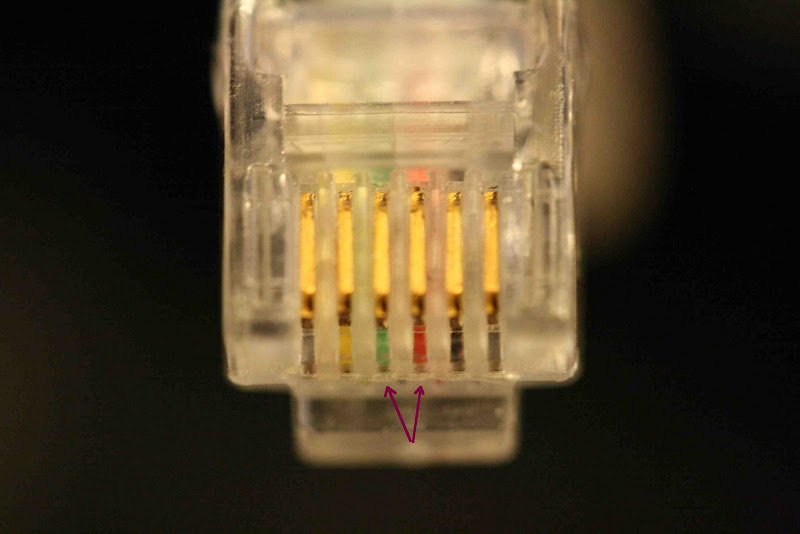
Ok, if not yet done, hook up the wire to the RJ11 connector. Actually we only need the middle two pins, that are marked in the next example:

  • RED (pin 3= data)

  • Green (pin 4 = GND)


IMG_4059.JPG


If this is done, heat up the soldering iron. On the DS18S20, you also only need two of the three pins, the rightmost can be used for external power, but is not needed in our case.

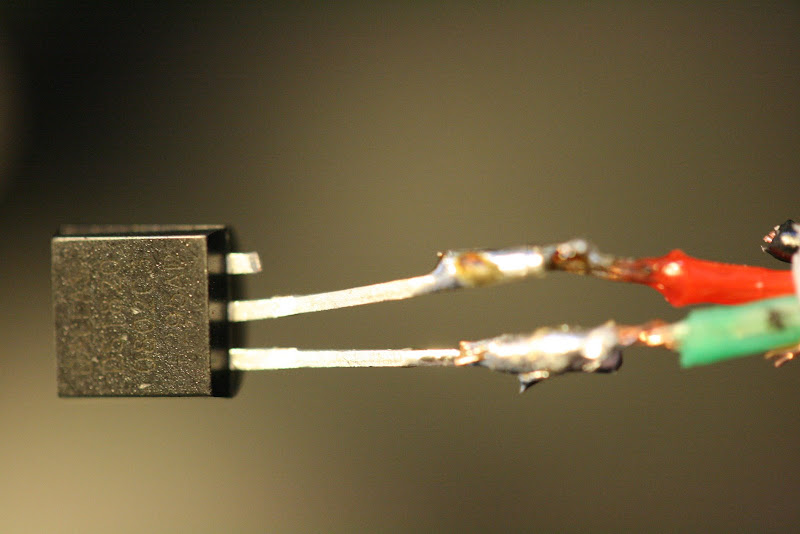
You have now to attach the wiring to the chip: put the ground (green in my example) on the left pin and the data line on the middle one - this could look like on the next image:

IMG_4060.JPG


At the end, put some isolation (duct tape) between the pins and wires and you are ready to go.

Installing the needed software


The installation of the needed software is a little hairy.
Basically it follows the example from comment #5 on this blog posting. It is written for Mac OS X, but will apply with minor changes to other systems as well.


  1. Download libusb and install it into /usr/local

  2. Download the PDK from http://globalreset.org/files/distribution/PDKAdapterUSB.tar.gz. Compile this by running make. If you are not on a Mac you probably need to change a few compiler settings. If this succeeded, you can run a test program via make test. This should output some stuff -- and especially that the adapter has been found. If you have attached the sensor to the adapter, it should print two lines that start on 'adress:' (e.g.:

    find first: true
    address: D70008017DFCC410
    address: 5D0000002B3C2081

    Install the created libonewireUSB.jnilib to /Library/Java/Extensions/ (if you are on a Mac, ymmv else).

  3. Download the 1-wire SDK from Maxim. This package contains a jar archive OneWireAPIsrc.jar -- extract this

  4. Add the class PDKAdapterUSB.class from the PDK into the right folder of the OneWire src that you just unpacked

  5. Compile the classes from the OneWire sources and build up a jar archive (OneWireApi.jar).

    If you want to use the example code from the OneWireApi, you have to modify OneWireAccessProvider.java to be able to load the PDKAdapterUSB. I also had to commend out a few java files for the serial adapter access, as they gave me compile errors).

  6. Install the OWlib in your local maven repo like this (replace /Users/hrupp with the path to your maven repo):

    mvn deploy:deploy-file -Dfile=OneWireApi.jar -DgroupId=com.dalsemi -DartifactId=OneWireApi -Dversion=1.10 -Dpackaging=jar -Durl="file:///Users/hrupp/.m2/repository/"


That's it for now, we now have all prerequisites. In the next posting I will describe how to write the RHQ part of this.

Friday, August 29, 2008

Lego-Olympics

Etoday had pictures of the HK Lego user group implementing Lego-Olympics 2008:
Those are pictures of the Olympic sites built with Lego bricks. Very cool.

Why conference calls fail (6)

Tuesday, August 26, 2008

RHQ: Compiling the apache snmp module on Mac OS X

RHQ and JBossON allow you to monitor Apache servers through its apache plugin. We have official support via precompiled plugins for Linux and Windows and instructions in the JBossON wiki on how to compile this for other Unixoids. While Mac OS X is a Unixoid (under the covers :-), the compile of the snmp module will not directly succeed.

I want to show here how to do that anyway (I did this against apache 2.0.63 from Macports):


  • First, if not yet done install Macports


  • Then, install libtool from within macports

    sudo port instal libtool

  • Chdir to <JON_AGENT_INSTALL_DIR>/product_connectors/apache-snmp/source

  • Edit the build script (build_apache_snmp.sh) to replace two occurances of libtoolize with glibtoolize

  • edit snmp_common/ucd-snmp/agent/auto_nlist.c
    to include <sys/types.h> : (around line 30)

    #include <sys/types.h>
    #include "asn1.h"
    #include "snmp_api.h"


  • Run the build as indicated on the build page

  • When adding the snmp module config to httpd.conf, specify /var/db for SNMPVar:

    SNMPVar /var/db


Done! :-)
You can now (re)start apache and take it into inventory.

To do this, please specify the root path of the server and the relative path to the htttpd binary, as apache2 from macports is called 'httpd' and not 'apache2', so it won't be correctly detected otherwise.

Tuesday, August 19, 2008

Reflection, the complicated way .. :-)

Just found that in some code, had to share this gem:

Object o = ...;
 
try {
bsh.Interpreter i = new bsh.Interpreter();
i.set("foo",o);
String bar = i.eval("foo.bar");
}
catch (bsh.EvalError e) {
...
}


Ok, not everyone is intimate with reflection and Interpreters often don't care what exact runtime type an object is (as long as you they are assignment compatible), but the effort to call BSH for this is as high as to write some reflection code for it :-) Also pulling in BSH mean for that piece of code to quadruple the binary size ...