Showing posts with label Misc. Show all posts

Friday, November 09, 2018

L2tp IPSec VPN with Mikrotik

I recently discovered the VPN feature on my Android phone and though let me try this to set up a VPN with my home gateway, which is a MikroTik router.

I followed a few guides on the internet, but this just did not work, Android just gave me a short "does not work" message and that's it. So I dropped the ball again.

Now I am going to talk at a conference and I thought, I could set up the scenario on my BigBox at home instead of the Laptop. But how do I expose that? Well, perhaps I should use a VPN. So I googled "MikroTik macOS VPN" and found a few pages that also repeated what I had set up before. I tried again, no luck. Did some packet sniffing on the router. No luck.

And then I got a thought: what if my provider filters udp port 500? Googled around, does not seem so. But it brought me to another idea:

MySetup

If you look at the above setup, you can see that my MikroTik is not directly connected to the internet, but there is a provider router in-between. And this guy also has a firewall and is filtering out ports. In the past I had poked some holes into this (but I log forgot since), but udp port 500 and others needed for IPsec were not forwarded to the MikroTik.

Once I enabled forwarding of these ports, both VPN on macOS and Android started to work like a charm. :-)

One thing I still had to enable was proxy-arp as described in the above guide to be able to reach not only the router, but also my real target host on my LAN.

I have after the good setup played a bit with the configuration (and not put it under version control and everything failed with "no IKEv1 peer config for". Solution was that I had a local address in the /ip ipsec peer and this meant that MikroTik would only allow for connections to that specific IP, which failed.

Another good guides on the topic:

Wednesday, October 03, 2018

MikroTik: access control helpers

I have a MikroTik router and am overall pretty happy with it. Especially the Caps-Man feature for central administration of Wifi access points is great.

One thing I am a bit fighting with is restricting my kids from accessing the internet at certain times of the day. The firewall offers quite some features, but I can't get it to cut existing connections when the rule is triggered by time (and this is also true for the dynamic rules of the kid control feature). But then perhaps I just don't understand routeros well enough.

What I have done is to set up access-lists for caps-man. When they are enabled, WiFi access is no longer possible. They kick in well at the right time, so all is good.

But: sometimes my kids get legitimate exceptions and when I then forget to re-enable the rule, they won't tell me :)

What I have done is created the following script, which is nightly triggered from the scheduler:

:local maccaps
:foreach i in=[/caps-man access-list find ] do={
  :set maccaps ( [/caps-man access-list get value-name=comment number=$i])
  :if ($maccaps~ "^RESET .*\$") do={
       /caps-man access-list enable numbers=$i
    }
}

This looks for access list entries with a comment, where the comment starts with "RESET ". If found the script just re-enables that access list rule.

Permissions needed are read, write and policy.

Please let me know if there are better options.

Monday, February 22, 2016

Flashing new NodeMCU Lua firmware to Adafruit Huzzah ESP

Adafruit delivers the Huzzah ESP with NodeMCU 0.9.5, which is pretty old.

So I was thinking of a newer version. The process is pretty well described on nodemcu.readthedocs.org. Unfortunately it also says

The address for esp_init_data_default.bin depends on the size of your module's flash. ESP-01, -03, -07 etc. with 512 kByte flash require 0x7c000. Init data goes to 0x3fc000 on an ESP-12E with 4 MByte flash.

After digging through Adafruit docs (they do not explicitly mention the type of ESP) and also looking at the output of node.info() I figured out that the Huzzah ESP has an ESP12 with 4MB

I got my self a new image from the awesome on demand build service and then flashed it like this:

$ python esptool.py --port /dev/cu.usbserial-AI02CSDU \
   write_flash 0x00 ../nodemcu-master-15-modules-2016-02-18-08-33-47-integer.bin \
               0x3fc000 ../esp_iot_sdk_v1.4.0/bin/esp_init_data_default.bin
Connecting...
Erasing flash...
Took 2.12s to erase flash block
Wrote 423936 bytes at 0x00000000 in 45.8 seconds (74.1 kbit/s)...
Erasing flash...
Took 0.10s to erase flash block
Wrote 1024 bytes at 0x003fc000 in 0.1 seconds (85.4 kbit/s)...

Future updates of the firmware to newer versions no longer need to flash the esp_init_data_default.bin file.

Tuesday, October 27, 2015

WiPy on the home network

Recently there was a Kickstarter about "an Arduino that runs Python", the WiPy. This is a small IoT board with WiFi on it (which is not available on stock Arduinos) for an attractive price. And being able to use a high level language along with a lot of existing libraries makes it attractive too.

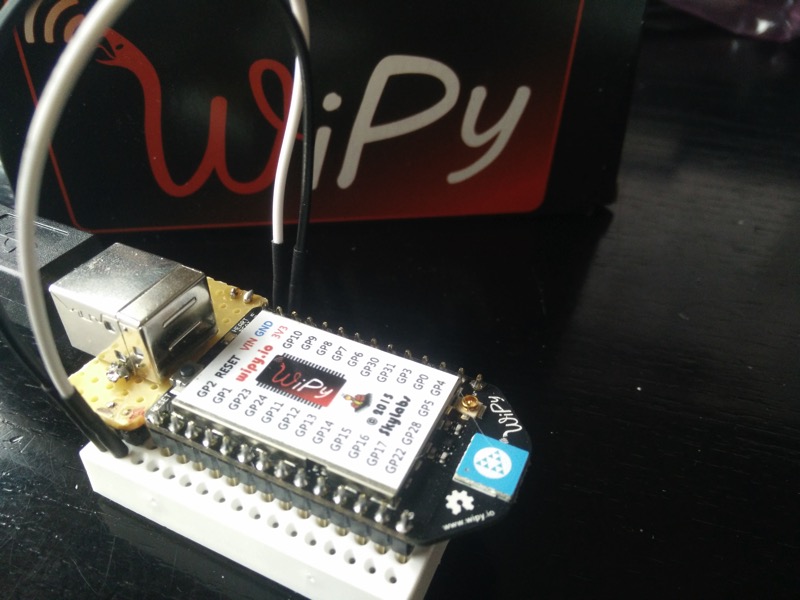
A few days ago I got the WiPys that I backed and the first obstacle to get the running was the power supply as they do not have a (micro) USB connector on board (and I also did not back the extension boards they offered).

Luckily I still had an old defunct USB hub from which I could solder out the connector and put it on a small PCB for this purpose (while doing that exercise I also found out that the 5V of the USB port are allowed to be 4.75-5.25V and on the end of a hub even being as low as 4.4V).

WiPy on BreadBoard
WiPy on Breadboard with USB power supply connector.

Now that the WiPy is on the breadboard, I set up my computer to scan for the WLAN of the WiPy and then telneted into the device. I poked around and tried to inspect the WLAN settings as described in the manual:

>>> from network import WLAN
>>> wlan = WLAN() # we call the constructor without params

This immediately made the connection drop. It turned out I needed to first update the firmware to the latest version (v1.1 at time of the writing), which was painless (but a bit confusing, as they also supply a bootloader.bin, that is not needed).

After the firmware upgrade the above worked and I tried to change the device to talk to my home network. The caveat here is that at the moment you issue

wlan.init(WLAN.STA)

to put the machine into station mode (default is being an access point), the connection drops. Some users have solved that by connecting via UART and serial line, but I did not really want to go that route.

Instead I edited boot.py on my local computer and then uploaded it via ftp into /flash. I found out, that if you don't terminate the ftp client and have a telnet connection open as well, I could easily (syntax) check the uploaded file by pressing Ctrl-D in the terminal:

MicroPython v1.5-1-ge954604 on 2015-10-21; WiPy with CC3200
Type "help()" for more information.
>>>    <control-D>   <-- here
PYB: soft reboot
Traceback (most recent call last):
  File "boot.py", line 17, in 
NameError: name not defined

The WiPy tells me that there is an error in my file, so I edit it locally and upload it again via the ftp connection. And only at the end when the WiPy is happy, I press the hard-reset button.

Now for reference my boot.by that worked for me:

from network import WLAN

SSID = 'home_SSID'         # SSID of your home network
AUTH = (WLAN.WPA2, 'very_secret') # WPA secret as 2nd param
IP = '10.1.2.42'           # Fixed IP the device should get
ROUTER = '10.1.2.3'        # IP of your router
DNS = '10.1.2.3'           # IP of your DNS server
NETMASK = '255.255.255.0'  # Netmask to use

import machine

wlan = WLAN()

if machine.reset_cause() != machine.SOFT_RESET:
    wlan.init(WLAN.STA)
    # configuration below MUST match your home router settings!!
    wlan.ifconfig(config=(IP, NETMASK, ROUTER, DNS))

if not wlan.isconnected():
   wlan.connect(ssid=SSID, auth=AUTH, timeout=5000)
   while not wlan.isconnected():
      machine.idle() # save power while waiting
   print('WLAN connection succeeded!')
Parts of that script were taken from the WiPy WLAN tutorial and this WiPy Forum post.

Monday, February 23, 2015

Little extension board for the PI

Long time ago I've started creating a small extension board for the RaspberryPI to get some physical world into hacking.

Img of installed and running board
Board installed and running on the PI.

The first iteration was on a bread board with some wiring, then for the next iteration I took a stripe PCB and wired it there. Worked but was not pretty:

Prototype board

Anyway, as the concept worked out, I decided I need some printed circuits. I played around with some options, but nothing was really cool for hobbyists (and I did not want to manufacture them my self with all the chemicals needed). And then I found Fritzing, which was exactly right.

Not only does Fritzing produce boards, but it also a nice graphical editor application that can be used to create a schematic, assign parts from a large part library, (auto) route the schematic and send the result to production

Fritzing editor with PCB layout
Fritzing editor with routed PCB in both side view

After I created the layout etc. I sent the design to the Fritzing fab and got by PCBs back after around a week of round trip time.

Yesterday I now sat down with the PCB, some needed parts and my soldering iron and assembled the parts

Parts and PCB
The parts
After soldering the low profile parts
Low profile parts soldered in
Most parts soldered
Assembled

In the last image there was still the thermo sensor missing, as well as the 4th LED.

Now when that board is put on to the extension header of the PI (inner row, that is closer to the CPU, the following little shell script will light all LEDs and then display the current temperature every second


#!/bin/sh
set -x
cd /sys/class/gpio
for i in 10 22 27
do
echo $i > export
sleep 5
echo out > gpio$i/direction
sleep 5
echo 1 > gpio$i/value
done

cd /sys/bus/w1/devices/10-*
while true
do
cat w1_slave | grep t=
sleep 60
done

There is one line that may need tailoring depending on the variant of DS1820 thermometer chip you have


cd /sys/bus/w1/devices/10-*

One thing where I am not yet sure is if the DS1820 actually needs the phantom power. In an older experiment with the chip, I did not connect pin 3 at all. I think this additional power may even heat the thermometer chip, as the values that I currently get a are some 5-6 degrees too high.

To read the state of the push button you can use this script


cd /sys/class/gpio
echo 9 > export
cd gpio9
while true ; do cat value; done

If you are interested about more details of the board, you can look at this Fritzing page, where I've uploaded the .fzz file.

And if you are using RHQ, you can look at this agent plugin to use the LEDs and the thermometer chip from within RHQ.


Tuesday, September 08, 2009

What a weekend

I am currentl staying in New Jersey, as the opportunity to give a talk at JBossWorld in Chicago also gave me the opportunity to go to NJ to meet the biger part of theJopr developers.

I arrived friday evening and as the car rental company ran out of cars, I got the last one remaining: a Chrysler Sebring convertible. On Saturday I went running and also drove around a lot with the roof open and music turned on - very nice :-)

Sunday I spent with Jess and family. Jess and I went climbing - my first time, but this was fun. One one side I can't imagine to do it more often, but on the other side I can :)

Today was Labour Day, so no one in America is working (only joking) and I went to New York. Walked around a lot and visited important landmarks like the Brookly bridge and the Apple store on 5th avenue.

Friday, January 09, 2009

Warranty, repairs, downtime etc.

So, as I was twittering I had an issue with my mac mini at home and especially with its connected Raid in a Taurus case.

The internal hard disk of the mini seems to have died and the raid behaved strangely too. Ok, I got myself a new internal hard disk for the mini and restored it from a Time Machine backup. No really big deal (wasn't too easy, as the installer does not want to directly install from the backup when the data on the backup is more than the internal HD size and it does not let you ignore parts of the data).

But then I had to find out that (very probably) the power supply (one of those external bricks) is broken. When I put a volt meter on the 12V line, I see the voltage dropping to < 11V when the drives want to start, so the drives don't spin up.

I had bought the Taurus enclosure at a local dealer and went there last monday. They were not able to do anything about it, but to sent it to their central office. Today I was calling them about the status and the lady on the phone told me that the box was sent to the central office on wednesday (Tue was a bank holiday here in Stuttgart) and that they did not yet have it in the systems in the central office. She told me that they will probably take it into the system today and starting on it on monday.

If I extrapolate this, I will hopefully the box back monday in a week resulting in 2 weeks of downtime just from the dealer service side.

This is extremely annoying.

When I think back - if I did not go to the local dealer "competent, service, ..." but would have ordered somewhere on the internet, I would probably have saved money when buying and wouldn't have a longer downtime now.

How are your experiences? How do you handle this? I am a prosumer here - this is no way to order a 1 day pickup-return service. Also I can't really afford a several k€ raid array. Actually that raid is just an example of the underlying issue: buying from a local dealer in the hope of getting service - or buying just at the lowest cost (and possibly throwing the stuff away to buy new one).

Sunday, November 23, 2008

First snow this year

Yesterday we had the first snow this year. Orlando was very excited and directly went outside before breakfast to remove the snow from out car (there was not enough on the sidewalk to wipe it). During the day the snow melted.

When we woke up this morning, the roofs were again white. And in the evening we sort of had a snow storm. This would have been cool to watch from inside, but we had to drive around and then it was less fun.

Lets see how this continues, as this is already more snow than what we had last winter. Perhaps we can even drive to the Schwäbische Alb, which is not too far to go skiing or snowboarding.

Monday, November 10, 2008

Deep Purple in Rock

Last saturday we've been at the Deep Purple concert here in Stuttgart in the Schleyerhalle. The Schleyerhalle was nearly sold out. After Gotthard as opener (they played 1:15h), Deep Purple started fast and furious with some tracks that I did not know (probably some newish :-) stuff).

But there have been enough 'classics' too and it was a great concert again. Don Airey is a good replacement for John Lord, but I missed the Organ-Guitar question and answer game, that John Lord and Richie Blackmoore were doing.

Deep Purple played 1:30h and then again 30 minutes.

It was a great concert and I would go there again.

Tuesday, October 21, 2008

Qype - where is the content?

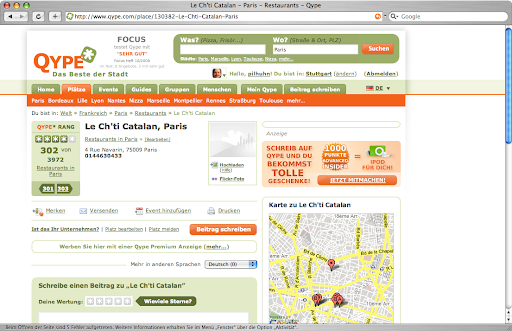
I am a heavy user of Qype and have already contributed quite a lot, but recently the site is overloaded. And worse: you don't even find the content anymore:

Screenshot_3.png
(Click for a larger image)


You can see that the place has 4 stars on average. You can see that you can win something, you have a place to comment, you can book an ad for this place but where is the content, that made up the 4 stars?

Well, the solution is here:

Bild 1.png


There is only content in French, so it is hidden from me - and only when I open that popup, I will see that there is actually content. This sucks!

And for my 1280x800 display, this page is just too full. The page layout has been a lot better in the past.

Friday, August 29, 2008

Lego-Olympics

Etoday had pictures of the HK Lego user group implementing Lego-Olympics 2008:
Those are pictures of the Olympic sites built with Lego bricks. Very cool.

Monday, August 04, 2008

NanoMaps for Mobiles | Features | TrailRunner

Wolfgang picked up my "how to" to import the Nano maps into phones like the K610i. You can find the entry here:

NanoMaps for Mobiles | Features | TrailRunner


Sunday, July 27, 2008

First 100km

As I indicated in this post I have started running again some weeks ago. Now after around 7 weeks, I crossed the 100km barrier (so this makes 15km per week on average, in 2 sessions on average per week).

Lets see if I will stay motivated to do the next 100km also in 7 weeks or less.

One of my big motivational factors is clearly Trailrunner, a very cool desktop app for the Mac to file each run in a training diary and to graphically select routes and compute distances etc. It's really fun to select new routes to run.
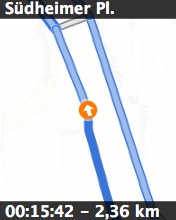
Trailrunner is even able to create images from the route
Daheim73-04.jpg


that can be uploaded to an iPod or a mobile phone as a miniature map to go (the image shows on top the name of the way-point and on bottom the expected target time (*) and the distance from the start). Also the map data (from various map sources can be shown on those micro maps)


*): One can set an expected speed for each route which is used to compute the expected time for each way-point; this helps to adjust the running speed while on the go.

It's no full blown GPS navigation (which seems to be supported with more sophisticated devices like the Garmin Forerunner), but is very helpful when running a new track for the first time.

Thursday, April 10, 2008

Qype City Night am 9.4.2008


Today we had the first Qype City Night (QCN). As previous trials to meet did not succeed at all, I was very curious what would happen.
Eight Qyper wanted to come originally, but then a few cancelled and others joined. At the end we have been six persons. I am a bit disappointed about that, but on the other hand not too many people have spare time on wednesday evenings.

I think Qype should provide some more mechanisms for QCN hosts like
banners on a city that tell about the QCN, a tools for registration and the possibility to send reminder mails a few days before the meeting.

But then it was nevertheless fun :-)

See also http://www.qype.com/forums/35/topics/2710-Qype-City-Night-am-9-4-2008?page=3#post_39811

Wednesday, March 26, 2008

Cool stuff: alltop.com

I recently stumbled over a service called alltop without really knowing that this is new etc. I thought "how nice, all mac related blogs" aggregated.
Meanwhile I found an anouncement about it on the blog of Guy Kawasaki (as he is a co-founder of the company that runs that site).

Wednesday, February 27, 2008

Qype video

Qype [kwaip] has posteda nice video that explains how its name is pronounced. German only. It is supposed to be shown in German cinemas soon. Will be interesting to see it there and to see how people react.

Saturday, August 11, 2007

Must sees in Stuttgart (?)

As you know I am a regular qyper since end of last year. Recently I got asked by another qyper from outside Germany what are the must sees in Stuttgart.
Well, the first solution to this would be to just select the entries with 5 stars. But this still leaves a big chunk of things.

So this is a very subjective list of must sees from my point of view. All urls refer to qype entries:

- TV-Tower: This is located on the top of one of the surrounding hills and was the first all concrete TV-tower in the world. You have a great view from up there. You can get there with Subway U7 from main station.

- Killesberg (+ tower) it is a nice parc with a cool tower there as well. You can get there via U7 as well (in the other direction). When you are up there and are into architecture, then you should also go and see the Weissenhofsiedlung or on Qype

- The Zacke also gives nice views over Stuttgart. Tickets for public transport are vaid here as well.

- The Königsstraße is the main shopping mile and starts at the main station. When you walk this pedestrian zone, you pass by at the châteaus , the new Kunstmuseum (this entry only describes the bar, but the picture shows what to expect) This link is better: http://www.kunstmuseum-stuttgart.de/de/index2.php

Then of course as the City of Mercedes and Porsche there are museums as well:
- Porsche Museum (currently in construction, but the old one is not far away.
- Mercedes Benz Museum


There are plenty more things to see. Check out the Qype listing for Stuttgart

Sunday, May 06, 2007

Visit to a historic iron mine

Today we made an excurs to an abandonned iron mine in Aalen-Wasseralfingen (around 80km from Stuttgart). The mine itself has been shut down after WWII and is now open for visitors. With little trains one drives into the 400m into the mountain. After a little film about the history of the mine and its general layout, one walks for about 800m through the mine and gets a very good impression why it is a good idea to wear a helmet.
The tour gives a very good impression under what bad conditions our ancestors were pulling iron ore out of the mountains, and it is a perfect occasion to go there when kids start to learn about those things in school.