Thursday, January 21, 2010

JBoss talks at FOSDEM 2010

FOSDEM, the Free and Open Source Software Developers' European Meeting

I will talk at FOSDEM 2010 in Brussels about RHQ and Jopr. (Sat, 3pm)

There are actually other JBoss-related talks too:

Of course, there are lots of other interesting talks at Fosdem (some would say: too many):

And much much more.

For iPhone users there is an application available that holds the whole schedule, can inform you what is running now and next and can hold your favorites

Monday, January 18, 2010

RHQ / Jopr tab sweep


Call for papers for JBoss World 2010 in Boston

ends on January 22th - be sure to submit a talk about Jopr or RHQ!


Other news:

Mazz has updated the Byteman plugin for RHQ see http://management-platform.blogspot.com/2010/01/byteman-plugin-revisited.html

Mobicents JAIN SLEE server 2.x does now also support management via Jopr / RHQ (via Amit Bhayani).

We've got some French translations for Installer messages in - those have been provided by Victor Montaner long time ago. If you want to help translating the messages into other languages, feel free to ping me or any other team member.

Speaking of participating: this wiki page contains a list of hints about contributing to RHQ.

RHQ Mastermind Greg Hinkle has written a longer blog post about autocompletion in the RHQ Command line interface (CLI).

I will talk at FOSDEM 2010 in Brussels about Jopr and RHQ. FOSDEM is one of the largest open source conferences in Europe (5000 attendees expected). Have a look at the JBoss developer room page for the exact schedule (as soon as it is published). And the best: admission is free!


FOSDEM, the Free and Open Source Software Developers' European Meeting

Sunday, January 10, 2010

Laufen mit Daisy (German)

Seit Freitag hat uns Tief Daisy fest im Griff und dementsprechend ist alles weiß. Hier im Süden ist es nicht so tragisch, wie beispielsweise in Brandenburg. Ich bin dann heute nachmittag doch noch aufgebrochen und eine Runde gelaufen. Es ist interessant wie viele Gehwege nicht geräumt sind, obwohl doch Räumpflicht besteht (nicht dass ich auf die Räumung bestehen würde). Laufen auf Schnee war ja ganz ok, aber im lockeren, mehrfach von Autos oder Fußgänger durchpflügten Schnee ist es ganz schön anstrengend. Deswegen war ich auf den 12km dann auch eher langsam unterwegs. Spaß gemacht hat es trotzdem :-)

Wednesday, December 30, 2009

Laufen 2009 / 2010 (German)

Das Jahr neigt sich dem Ende zu; Zeit für einen Jahresrückblick: ich habe beide gesteckten Laufziele gut geschafft:

- Stuttgart-Lauf ankommen. Ich habe das Ziel dann zweimal hochgesetzt. Erst auf unter 2:30h und dann auf unter 2:15h. Letztlich war es dann besser :-)

- Mehr als 750km laufen - das habe ich mit 792km auch gut hinbekommen - wenngleich ich im Dezember nochmals richtig Gas geben musste


Einheiten75
Distanz792,23 km
Distanz pro Einheit Ø10,56 km
Pace Ø5:55 min/km
Geschwindigkeit Ø10,14 km/h
Fitness46 (37-45)
Puls Ø / Max159/191
Kalorien62237

Bester Monat war der Dezember mit 135km

Läufe an "exotischen" Plätzen:


Ziele für 2010

- Stuttgart-Lauf schneller als 2009 (also unter 1:59:04) - wenn das Wetter mitspielt und ich nicht krank bin

- 900 Laufkilometer

Monday, December 21, 2009

RHQ / Jopr tab sweep

This post is to gather a few of the recent developments around RHQ and Jopr

Just in case you have missed it: RHQ 1.4.0.B01 is out - this build contains the Jopr plugins and thus is the successor of the Jopr-server builds that you have seen before.

Mailing lists:

We have opened two mailing lists for RHQ where we expect to bundle the email activities in the future:

  • rhq-users: for user questions around RHQ (including the Jopr plugins

  • rhq-devel: for developing with and on RHQ


Video:

Galder Zamarenno from Infinispan has created a video showing a three-node Infinispan cluster being monitored. It demonstrates graphical measurements, and non-graphical information of running Infinispan instances, addition or removal of monitored metrics and finally, execution of management operations on a Infinispan instance.

Mazz has created a demo on how to use the new server side plugins to periodically create reports on the server.

Alert senders:

Alert notifications can now be processed by plugins. This means that it is finally possible to easily write own notification schemes to forward alerts to various devices. Two posts show how to write such a sender (Part 1 & Part 2).

Agent plugins:

A new agent plugin allows to use script in Ruby and JavaScript to do monitoring. This allows to easily monitor resources via dynamic scripting languages without writing Java code.

Tuesday, December 15, 2009

How to write an alert sender plugin for RHQ/Jopr (Part 2)

Now that we have seen the "theoretical side" of writing an alert sender, lets just start and code one up.

First grab RHQ from GIT and then change into
modules/enterprise/server/plugins.


  • Run this little script:

    mkdir alert-url
    cd alert-url
    mkdir -p src/main/java/org/rhq/enterprise/server/plugins/alertUrl
    mkdir -p src/main/resources/META-INF

  • copy over the pom.xml from alert-email and change email to url in it:

    cp ../alert-email/pom.xml pom.xml,1
    sed -e 's/email/url/' < pom.xml,1 > pom.xml

  • Lets edit the plugin descriptor

    vi src/main/resources/META-INF/rhq-serverplugin.xml

    <alert-plugin
    name="alert-url"
    displayName="Alert:Url"
    xmlns="urn:xmlns:rhq-serverplugin.alert"
    xmlns:c="urn:xmlns:rhq-configuration"
    xmlns:serverplugin="urn:xmlns:rhq-serverplugin"
    package="org.rhq.enterprise.server.plugins.alertUrl"
    description="Alert sender plugin"
    version="1.0"
    >

    This is just the generic header. Now lets set the target host name on the server-wide preferences and

    <serverplugin:plugin-configuration>
    <c:simple-property name="hostName"
    default="localhost" />
    </serverplugin:plugin-configuration>

    Now the name of the sender and its alert sender class

    <short-name>Url</short-name>
     
    <!-- Class that does the actual sending -->
    <plugin-class>UrlSender</plugin-class>

    And now finally the Information that is specific to an alert definition. Lets just set the port here for demonstation purposes.

    <alert-configuration>
    <c:simple-property name="port" type="integer"/>
    </alert-configuration>
    </alert-plugin>

  • Now lets implement the Java sender class

    $ cd src/main/java/org/rhq/enterprise/server/plugins/alertUrl
    $ vi UrlSender.java

    package org.rhq.enterprise.server.plugins.alertUrl;
     
    import java.io.OutputStream;
    import java.net.HttpURLConnection;
    import java.net.URL;
     
    import org.apache.commons.logging.Log;
    import org.apache.commons.logging.LogFactory;
     
    import org.rhq.core.domain.alert.Alert;
    import org.rhq.enterprise.server.alert.AlertManagerLocal;
    import org.rhq.enterprise.server.plugin.pc.alert.AlertSender;
    import org.rhq.enterprise.server.plugin.pc.alert.ResultState;
    import org.rhq.enterprise.server.plugin.pc.alert.SenderResult;
    import org.rhq.enterprise.server.util.LookupUtil;
    import org.rhq.enterprise.server.xmlschema.generated.serverplugin.perspective.ResourceTaskElement;
     
    public class UrlSender extends AlertSender{
     
    @Override
    public SenderResult send(Alert alert) {

    So this was just the bolier plate code - now lets get the work done by first getting our data that the user entered in the UI

    String hostname = preferences.getSimpleValue("hostname","localhost");
    String portS = alertParameters.getSimpleValue("port","80");

    Then construct an URL and URL connection

    HttpURLConnection conn = null;
    try {
    URL url = new URL("http://" + hostname + ":" + portS);
    conn = (HttpURLConnection) url.openConnection();
    conn.setRequestMethod("POST");
    conn.setDoOutput(true);
    conn.setDoInput(true);
    OutputStream out = conn.getOutputStream();

    Then we get the message together - you see, you can even call into the EJB layer to get things done - and send it off.
         
    AlertManagerLocal alertManager = LookupUtil.getAlertManager();
    StringBuilder b = new StringBuilder("Alert: '");
    b.append(alert.getAlertDefinition().getResource().getName());
    b.append("' (");
    b.append(alert.getAlertDefinition().getResource().getId());
    b.append("): ");
    b.append(alertManager.prettyPrintAlertConditions(alert));
     
    out.write(b.toString().getBytes());
    out.flush();
    conn.connect();
    } catch (Exception e) {
    return new SenderResult(ResultState.FAILURE,"Sending failed " + e.getMessage());
    }
    finally {
    if (conn!=null)
    conn.disconnect();
    }
     
    return new SenderResult(ResultState.SUCCESS,"Sending to " + hostname + ":" + portS + " worked");
    }
    }

    After this was done, we return our operation result in a new SenderResult object - that's all.

    Now just change back to the root directory (the one with the pom.xml file) and fire "mvn install". This leaves you with a jar archive in target/ that you can then deploy into a (running) server:

    Deploying the plugin


    You can deploy the plugin in three ways, where the first one is probably the best, when developing such a plugin:

    • run mvn install above with option -Pdev - this will automatically deploy into the development containter
    • copy the plugin manually into the dropbox at $RHQ_SERVER/plugins (that directory is in parallel to bin/ and jbossas/ )
    • Deploy via GUI:


      • Go to the plugins page
        Bildschirmfoto 2009-12-15 um 21.00.37.png


        and select server plugins at the top tab
      • Scroll down to the upload box, select add, select the plugin in the open dialog and then when done, click on "upload".
      • Press "scan for updates" at the bottom of the plugin list above - it should now show up in the list of plugins


    Configuring it


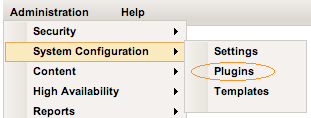
    Click on "Alert:Url" in the list of plugins. This will bring you to the plugin details. And then on "Configure Alert:Url" (configuring could also happen from the Administration->System Configuration->Settings menu).

    You will see a list of plugins where the Alert:Url one is selected on the left and the current site wide preferences on the right:

    Bildschirmfoto 2009-12-15 um 21.41.18.png


    If you click on Edit, you can edit the host to some other value than the default.

    Using it in an alert definition


    Go to the usual screen for alert definitions of a resource - in the preliminary gui, there is a link To Alert sender plugins; click it.

    You will come to a screen with a drop down - select Url from it

    THIS UI IS CURRENTLY WORK IN PROGRESS

    Click on "Go" and then in the configuration enter the port number to use. Click on "submit it".

    Done

    Congratulations


    you have just written and deployed your first alert sender plugin for RHQ and Jopr


Monday, December 14, 2009

How to write an alert sender plugin for RHQ/Jopr (Part 1)

Now that RHQ 1.4.0-B01 is out, it is time to show you how you can easily write your own alert notification mechanism and plug it into RHQ (see also "RHQ and the future of alerts").

As an example we'll use a sender that will use a http-POST request to a remote host where the body of the request will contain the alert message (like the one you know from the existing email-sender).

But before we do this, I'll show you the bits involved, so that the source code is easier to understand.

In order to write the plugin you need two things at least:

  • plugin descriptor

  • a sender class


Sometimes you also want to implement a component class (more later).

So lets have a look at them in turn:

Plugin descriptor


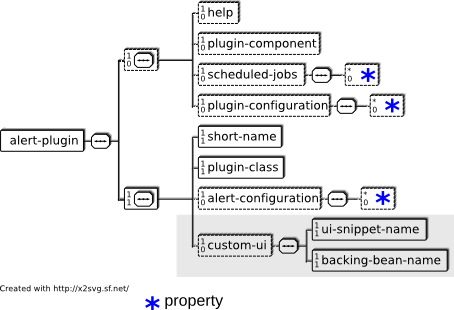
The structure of the plugin descriptor, rhq-serverplugin.xml, looks like this:

rhq-serverplugin-alert.png


It follows the schema definition in rhq-serverplugin-alert.xsd.
Elements in it are the following.
  • alert-plugin: This is the parent element for the whole descriptor. It contains the following attributes, which are all taken from the general server plugin descriptor:

    • name: name of the plugin

    • displayName: name of the plugin as it shows up in the UI

    • package: the package of the plugin. Is used to determine the fully qualified class name if it contains no package. Within RHQ, there is a naming convention of Alert:medium for this

    • description: A description of the plugin as it shows up in the list of plugins

    • version: the version of the plugin.


The first few child elements come from the general server-plugin descriptor and apply to all server side plugins.

  • help: general information about the plugin, that also shows up in the list of plugins

  • plugin-component: class name of a class that gets loaded on plugin start and stays there as a "singleton" until unload. See below.

  • scheduled-jobs: this is a configuration that allows you to have your plugin code be run at regular intervals; it is probably less of interest for alert senders

  • plugin-configuration: properties listed here will end up in the system-wide preferences system UI and serve to do general configuration of the plugin (like e.g. the name of a remote host where alert notifications should be sent to)


The next batch of elements is specific to the alert-plugins:

  • short-name: the short name of the sender. This is used e.g. in UI drop downs to select the sender

  • plugin-class: the name of the class that implements the abstract AlertSender class to build the actual sender.

  • alert-configuration: specific properties on a per AlertDefinition basis. This can e.g. be the list of email addresses the alert notification should be sent to.

  • custom-ui: this element is not yet active and is supposed to help building a custom UI if the UI via alert-configuration is not powerful enough.


The sender class


All senders need to extend the class org.rhq.enterprise.server.plugin.pc.alert.AlertSender which looks a little like this:

public abstract class AlertSender {
 
/** Configuration from the global per plugin type preferences */
protected Configuration preferences;
 
/** Configuration from the per alert definition parameters */
protected Configuration alertParameters;
 
/** Global component holding persistent resources */
protected T pluginComponent;
 
/** Do the work */
public abstract SenderResult send(Alert alert) ;
}


The method of interest is send(Alert) where you get the data for this specific alert passed in. You need to implement it.

The preferences or the alert definition specific properties are injected by the RHQ server, as well as the plugin component, so that you can just get your properties that you set up in the deployment descriptor via calls like this:

String hostname = preferences.getSimpleValue("hostName","localhost");

assuming that you have the following in the plugin descriptor:

....
<serverplugin:plugin-configuration>
<c:simple-property name="hostName" />
</serverplugin:plugin-configuration>
...


Component class (optional)


The component class is a class that implements the interface org.rhq.enterprise.server.plugin.pc.ServerPluginComponent. It can be used to e.g start up a connection to a remote host within the start() method and tear it down when stop() is called. You need to expect that start() and stop() can get calles multiple times during the life of a plugin.

The interface has two more methods: initialize() and shutdown() - those are called directly after loading and before unloading an alert sender. The idea here could e.g. to load an external library and unload it at plugin unload.

The component class is a "singleton" in the lifecycle of a server plugin and stays present while the plugin is loaded. It is optional for alert Plugins - if it is present, it will be injected into AlertSender.pluginComponent.

Plugin structure


The alert sender is created in the standard Maven-2 directory structure. Java sources go into src/main/java/, while the plugin descriptor goes into src/main/resources/META-INF/rhq-serverplugin.xml:

File system structure for an alert sender plugin


Round up


Ok, that's it for now. You have seen what is involved in writing an alert sender plugin for RHQ and Jopr (versions 1.4.0.B01 and up).

As always give me and us feedback - e.g. via Irc at #rhq on freenode.


Continue with part 2...

Friday, December 11, 2009

RHQ 1.4.0.B01 released - includes Jopr

The RHQ project is pleased to announce the release the first developer build of the RHQ 1.4.0 platform. This developer release, 1.4.0-B01, provides an early looks at the new features which we are planning for the 1.4.0. This release contains many of the plugins which had been available as part of the Jopr project, along with the plugins that were included in previous RHQ releases.

Note: we do not advise to upgrade any existing Jopr or RHQ installs with this build!

Check out the
Release notes.

And
download the software.
The individual maven project artifacts have been published to the JBoss maven repository under org/rhq/ and org/jboss/on/.

Source code can be found in the git repository at fedorahosted.

If you have questions, join us on #rhq on irc.freenode.net or use the mailing lists:

Of course you can still use the existing mailing lists and forums.

Tuesday, December 08, 2009

New experimental (ruby) script plugin for RHQ / Jopr (updated)

I've just committed an experimental 'script2' plugin to the RHQ git repository, that allows to write monitoring scripts in the Ruby programming language.

This plugin is not yet enabled in the normal build because of issues (see below) - if you want to have a look at it, go to modules/plugins/script2 and issue mvn -Pdev install.

To use the script, go to the platform and manually add a script2 resource
For the connection properties you need to specify the scripting language to use and the name of the script, which needs to exist at $AGENT/data/script2/ in the agents file system.

Your script needs to provide 3 functions: avail, metric(name) and trait(name) - here is an example to show this. By default 4 metrics named 'metric1'..'metric4' are collected as well as one trait called 'trait1'.


def avail
return 1
end
 
def metric(name)
return 4
end
 
def trait(name)
return "Hello Ruby World: #{name}"
end


Unfortunately there is still one issue in the code that makes the scripting engine "forget" the script, so that after some time you'll see
exceptions like the following show up:

:1: undefined method `avail' for main:Object (NoMethodError)

If you have an idea what is going on, please tell me.


UPDATE
Thanks to Yoko Harada I was able to isolate the issue and fix it. Basically the issue is that the script was evaluated in one thread and later its methods got invoked in other threads which did not contain the evaluated script. So now I am just always re-evaluating the script before calling invokeFunction(). This is somewhat slower, but works.

It looks like if I would use the Red Bridge api directly (which is part of the JRuby 1.4 distro), there would be a better way, but the current implementation would allow for different scripting languages. Which brings me to:

Also if you want to help to get other languages implemented, contact me.

Friday, December 04, 2009

Facelets ui:include considered powerful

Just as a preface: I am very far from being a JSF or Facelets expert - more a novice.


So lately I have been looking at how to dynamically include Facelets or general xhtml snippets into my JSF/Facelets pages. One of the tags made for this is of course <ui:include>. In its src-attribute you give a path to a page to include like <ui:include src="/path/to/file.xhtml"/>. So far so cool.

Now I want to have the page to include to be dynamic - after a lot of googling I found that I can actually pass an EL expression like this <ui:include src="#{BackingBean.path}"/>. This did first not work at all, because I had a typo in the name of the backing bean - and I just got an error "there is an error" :-/ After the typo was fixed, I was able to get the path from the backing bean.

Now there are situations where my included page can or should not be shown.

First (naive) approach was (we are using RichFaces):

<rich:panel rendered="someCondition">
<ui:include src="#{BackingBean.path}"/>
</rich:panel>

But no matter the condition, BackingBean.path was evaluated and this could return something that does not point to the file, which screwed up the whole page with the above "there is an error" message.

So I ended up with creating an empty page, that I put into the webapp and my BackingBean.path now looks like this:


public String getPath() {
if (someCondition)
return stringExpression;
else
return "/path/to/empty.xhtml";
}


This works like a charm.

And I also found out that the src-attribute of ui:include actually is an URL, which means, that it is possible to get the included snippet from a remote web site or from within a Jar file like


public String getPath() {
URL pathUrl = getClassloader().getResource("nameOnClasspath");
return pathUrl.toString();
}


So yes, <ui:include> is a powerful feature of Facelets.

Thursday, November 26, 2009

RHQ and the future of alerts

So don't get me wrong, alerts will stay within RHQ - I am not questioning them.
In contrary - I am actually working on improving the alert subsystem. As a start I've written some design documents that can be found on the RHQ wiki:


Please go through them and give us feedback.

But before I continue - a little teaser:

Sms_alert.jpg


I've extended the Mobicents sender in my experimental branch (see 'Jopr talking') to also support sending via SMS now. So the image above shows an alert sent via that mechanism. Thanks to Jean Deruelle again for helping me on the Mobicents side.

But now back to future alert design...

We have identified the following four fields of change / improvement:

  • Allow for pluggable alert senders

  • Allow to acknowledge alerts by users

  • When a resource is in maintenance mode, do not send alerts about it

  • Escalate alert notifications if an alert is not reacted on


Of course some of those are meant for the future - e.g. there is no maintenance mode yet.

The first thing - which I am currently working on are pluggable alert senders. So if you want to e.g write a sender that posts alert notifications to an IRC channel, you can do so now. This is done in a pluggable fashion, which means that the code that does the work and also the UI is encoded in your plugin.

If you want to write such a plugin, you need to do two things:

Extend the abstract AlertSender class and write a plugin descriptor (here is the schema)

I've started an example on how to use this API.

Note that all of this is not yet finished and may change at any time - again I'd like to hear your feedback.

In the very first version only UI elements that follow a <configuration> will be supported. Later it will also be possible to supply a XHTHL snippet for UI fields, where you need to write your own backing beans to transfer the values into the alert subsystem.

Monday, November 23, 2009

Struts 1 and enums - heads up

I lost some good hours on the weekend trying to find out, why a field in my struts form bean was not filled with the correct value, while I could see in the HttpRequest, that the browser / page was indeed sending the correct data.

My form bean contained something like:

public class MyBean extends ValidatorForm {
 
private MyEnum anEnum;
private String someField;
 
public MyEnum getAnEmum() {...}
public void setAnEnum(MyEnum val) {...}
 
public String getSomeField() {...}
public void setSomeField(String val) {...}
}


Not only did my class compile well, I also did not get any errors when running the code - except that anEnum was always populated with the first value listed in MyEnum.

After I changed anEnum to String (and the getter/setter too) and did the conversion to Enum in the backend code, all was fine.

And yes, after I found the solution, I remembered, that we did have such an issue in the past already :-/

Monday, October 26, 2009

RHQ and Jopr: new source repository

Yes, we can as well :)

In the past it was often confusing to users that we have two source repositories for RHQ and Jopr. We have recently changed this.

The new RHQ repository lives now at http://git.fedorahosted.org/. There are a few branches defined, but the main one of interest is origin/master.

As you can see, we have not only move the repository location, but also move to the git version control system and even merged Jopr and RHQ together into one repository - so no more riddling where to find what.


See also this post about the change to bug tracking.

RHQ Bugtracker moves to Bugzilla - action required

RHQ project logo

Project RHQ, which is the foundation for Jopr will soon move all bug tracking from the old JIRA system at jira.rhq-project.org over to a bugzilla instance at Red Hat.

So when you have an account at the jira and reported bugs, you should follow those steps to have your cases linked to you on the new bugzilla site:


  1. Go to bugzilla at bugzilla.redhat.com

    1. If you don't yet have an account create one with your preferred email address.
    2. If you do have an account, login (or submit a password change request then login). And make a note of the email address you are using.

  2. Go to RHQ jira (http://jira.rhq-project.org/browse/RHQ),
    log in and set your email address through your profile (http://jira.rhq-project.org/secure/EditProfile!default.jspa) to the one you are using in bugzilla above.

Cutover will happen within the next few days

For now, the Jopr bugtracker will stay at the JBoss jira, but will probably also merged into bugzilla in the future.

Tuesday, October 13, 2009

Embedding ruby in java - less than trivial so far

Currently I am trying to get puppet, a configuration management system to be executed in Jruby - and especially embedded within some java code.

Luckily there is the JSR 223 scripting available in Java6, so the start is relatively easy: get jruby from jruby.org and add it to the java programs classpath, java program code looks like this:


// Define path to jruby libraries
System.setProperty("jruby.home","/opt/local/share/java/jruby");

// Get the scripting engine
ScriptEngineManager m = new ScriptEngineManager();
ScriptEngine rubyEngine = m.getEngineByName("jruby");

// Define the puppet script to run as arguments
rubyEngine.put(ScriptEngine.ARGV,new String[]{"example.pp"});

// read the script
File f = new File("puppet.rb");
BufferedReader br = new BufferedReader(new FileReader(f));

// and execute it
rubyEngine.eval(br, context);


Simple - eh?

Unfortunately is it not that simple (yet).

Passing the argument vector to my script does not yet work in jruby 1.4 cr1 (see JRUBY-4090), so I need to do a work around of defining a script, that sets this and then calls puppet


ARGV << 'example.pp'

require 'puppet/application/puppet'

Puppet::Application[:puppet].run


Next, puppet is complaining about missing stuff like OpenSSL (which is a difficult beast in jruby, as the standard ruby implementation needs some C code, which can not directly run in jruby).

Also it is somehow complaining about yecht not being found - I still don't really grok setting and properties up things like jruby.lib, jruby.home etc.

If anyone can shed some light on it, I would appreciate it :-)

Wednesday, October 07, 2009

Jopr, RHQ and the availability check interval (updated)


Jopr and RHQ check from time to time for each resources availability. This is done in the agent, where a periodic thread calls the getAvailability() method of each ResourceComponent. After this scan the result is sent to the server and the server shows the red and green state on the resource.

This server side processing creates a certain stress in large environements (say: hundreds of agents with ten thousands of resources), so that in Jopr 2.3 we have increased the interval this check is done to 5 minutes.

For many use cases (smaller installs, testing) this is too long. Luckily, this interval is not cast in stone, but configurable in the agent settings file, conf/agent-configuration.xml:


<!--
 
_______________________________________________________________
rhq.agent.plugins.availability-scan.period-secs
 
Defines how often an availability scan is run. This type
of scan is used to determine what resources are up and running
and what resources have gone down. The value is specified in
seconds.
-->
<!--
<entry key="rhq.agent.plugins.availability-scan.period-secs" value="300"/>
-->


You see the default is shown as commented value. To change this to a different value, remove the xml comment signs around it and change this back to e.g. 60 seconds (it will probably not make any sense to go lower than that, as the load on the agent, your managed resource and also the Jopr server will increase again):

<!--
-->
<entry key="rhq.agent.plugins.availability-scan.period-secs" value="60"/>


After this is done, you need to restart the agent to have it read the new value (see also next paragraph).

UPDATE

As the agent writes its configuration into the java preferences as backing store, the above change will not directly be honored. This may sound strange at first, but it has the advantage that you can run an agent, remove it, install a newer version of it and have the new version automatically use the saved values of the first agent install.

So you need to tell the agent that it indeed should read the new configuration file. This can be done by starting the agent with the option --clenanconfig or better by supplying -c agent-configuration.xml. This is explained at the top of the agent-configuration.xml file and also in the yellow box in the agent install document.


Of course this applies to JBoss ON 2.3 as well.

Monday, October 05, 2009

Jopr installer bug - careful when testing


The RHQ 1.3 and Jopr 2.3.1 installer has a little issue (see RHQ-2222 jira), where it clears out the database password when you click on "Test connection".

Lets have a look at a screen shot:

Bildschirmfoto 2009-10-05 um 17.48.13.png


When setting a database password (green circle) and then testing the connection (orange circle), the password will be reset and the install will fail later on.

If you are using the embedded H2 database, just re-select it in the drop down (violet circle) to have the database password filled in again by the system. Actually with H2, there is no need to test the connection in the first place :-)

Friday, October 02, 2009

RHQ tip of the day: agent confused?

Darko asked the other day on the Jopr Irc channel:

I have an agent, which isn't collecting my cpu-load data any more. I also have many more problems with the agent. How can I reset the agent to collect all data again? It may have to do with the fact that I had a server crash on the system with the running agent. Since the crash the agent isn't working any more.

It looks like the internal state database of the agent got confused. When the agent is fully configured and working, it will save its inventory of locally managed resources (a part of the global inventory kept on the server) along with their measurement schedules in a local database.

The agent can use this database to start working on the next start even if the server is not reachable. Changes on the server will synchronized when the connection is up again.

Now back to the original question: To get the agent going again, you need to erase the bad inventory and sync with the server again. You can do this by passing option --purgedata to the agent commandline:

$ bin/rhq-agent.sh --purgedata

To see a full list of the agents command line options, you can pass the --help option to the agent start script.

Thursday, October 01, 2009

RHQ tip of the day: Help, my resource does not show in the tree!


We see it from time to time that people have correctly set up Jopr or RHQ and want to monitor e.g. a JBoss AS server or other resources. They even have an agent running on the machine with the JBoss AS on, but still it does not show up in the resource tree of this platform.

Most often this is a simple issue, as the resource is just sitting in the queue to be imported into inventory:

Screenshot of autodiscovery portlet


Just select the ones you want to import, click on the import button and after a second, the resource will show up in the resource tree below its platform.

Jopr and RHQ require this on purpose, as this way you can ignore e.g. servers that are just up at the moment of import, but which are not to be managed.

As you have seen that resources can be ignored, there is also a way to "bring them back" when you decide later to import them. Either click on "View all..." in the Auto-Discovery portlet seen above or select Auto discovery queue from the Overview menu, then select Both new and Ignored from the drop-down:

Bildschirmfoto 2009-10-01 um 10.14.02.png


This will show ignored resources, that you can check and then click un-ignore to get them back into the new state from where you can finally import them.

Wednesday, September 30, 2009

RHQ plugins - platform services

There was recently a question on the Jopr devel mailinglist, that Ian Springer answered - I've taken his answers to write this post, as this is of general interest to plugin writers.

Bruno asks:
I have written a plugin which defines a single service like so:
<plugin ...>
<service
name="Interdomain Service"
...
supportsManualAdd="true">
</service>
</plugin>

But during auto-discovery, the resource discovery component does not get called. It only gets called, if I define the Interdomain Service to be a server. What am I missing here?

Lets first have a look at the resource hierarchy within RHQ:
PSS-hierarchy.png


So for <server>s that are standalone within a <plugin> tag, it is obvious that the parent is the <platform>, while <service> can have both other ResourceCategory as parent.

This means that you have to define the service's parent type(s), so RHQ knows where to stick it in the type hierarchy once it's discovered. There are a few ways to do this, depending on your needs.

If it's a platform service (i.e. a service whose parent is the platform
itself), you'd do something like:

<service name="Interdomain Service" ...>
<runs-inside>
<parent-resource-type name="Windows" plugin="Platforms"/>
<parent-resource-type name="Linux" plugin="Platforms"/>
<parent-resource-type name="Solaris" plugin="Platforms"/>
<parent-resource-type name="HP-UX" plugin="Platforms"/>
<parent-resource-type name="AIX" plugin="Platforms"/>
<parent-resource-type name="FreeBSD" plugin="Platforms"/>
<parent-resource-type name="Mac OS X" plugin="Platforms"/>
<parent-resource-type name="Java" plugin="Platforms"/> <!-- any OS that RHQ doesn't have native (i.e. SIGAR) support for -->
</runs-inside>
...
</service>


(If your service will only run on certain OS'es, you could remove the
unsupported platform types from the list of parent types).

Or you could do something similar to say it can be the child of multiple
server or service types, e.g.:

<service name="Interdomain Service" ...>       
<runs-inside>
<parent-resource-type name="JMX Server" plugin="JMX"/>
<parent-resource-type name="JBossAS Server" plugin="JBossAS"/>
<parent-resource-type name="JBossAS Server" plugin="JBossAS5"/>
</runs-inside>
...
</service>


Finally, if you want it to be a child of a single server or service type
defined in the same plugin, just nest it inside the parent server or
service element, e.g.:

<server name="CoolServer">
<service name="Interdomain Service" ...>
...
</service>
...
</server>


The reason it works if you change it to a server, rather
than a service, is because, when parsing the plugin descriptor, if RHQ
encounters a server element at the top level with no runs-inside types
defined, it assumes the server is a platform server (a server who has
all the platform types as its parents). So:

<server name="Interdomain Service" ...>
...
</server>


is essentially equivalent to:

<server name="Interdomain Service" ...>
<runs-inside>
<parent-resource-type name="Windows" plugin="Platforms"/>
<parent-resource-type name="Linux" plugin="Platforms"/>
...
<parent-resource-type name="Mac OS X" plugin="Platforms"/>
<parent-resource-type name="Java" plugin="Platforms"/> <!-- any OS that RHQ doesn't have native (i.e. SIGAR) support for -->
</runs-inside>
...
</server>


Most of the time when writing a plugin you will probably start with a server at the top level of your plugin, so it will just work.