Sunday, August 09, 2015

mBot and Lego

Recently I got my Kickstarter-backed mBots from Makeblock, some cute little robots with basically an Arduino-brain.

And as the Kickstarter campaign was successful, I also got one of the nice LED-Matrix displays with it.

Now I wanted to mount the display on the front like they show on some pictures and the range sensor as well. Obviously that does not work as they go into the same place. Unfortunately there was no additional mounting bracket supplied.

Next try was to mount it at the back, but there are no mounting holes with (or without) thread available. Luckily we have a larger Lego collection and the website claims The chassis is compatible with Lego&Makeblock parts. Unfortunately this is not entirely true, as the holes in the mBot chassis are just a bit too small for the normal lego connector pegs or axles.

But don't fear :-)

First, with some M4 screws and nuts it is easy to just mount lego parts with the help of those:

IMG 20150809 125521

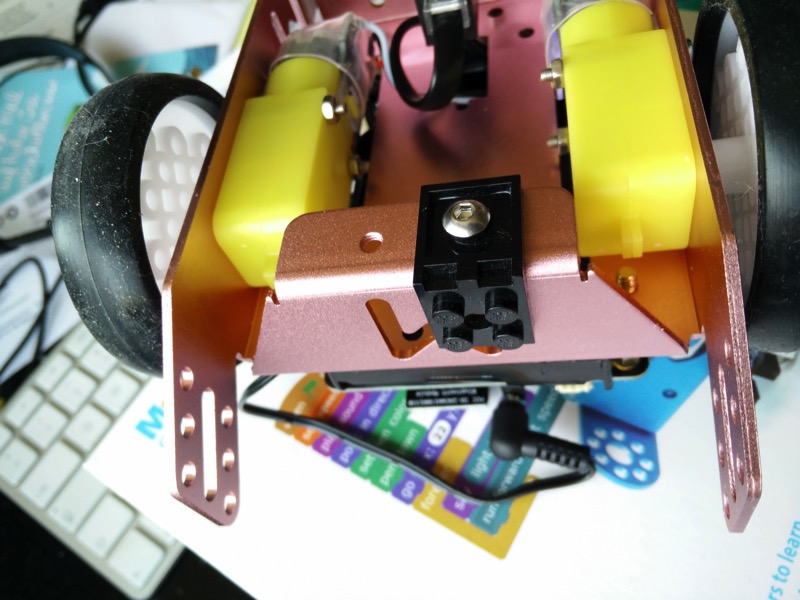
And luckily Lego also supports being mounted with M3 screws and nuts, so I basically created an adapter with some Lego Technic parts:

IMG 20150809 145058~2

And finally I was able to mount the display at the back of my mBot:

IMG 20150809 151116~2

I saw an image on the forums where someone mounted the display (for my gusto upside down) and the range sensor on top, but I think this way the sensor may be too high up and not find all obstacles.

Tuesday, July 07, 2015

Running OkHttpClient from within WildFly 9 (subsystem)

A few days ago WildFly 9 was released and one of the highlight for sure is the support of HTTP/2.0 in the Undertow web subsystem. As Hawkular has recently moved to use WildFly 9 (from 8.2) as its underlying server, it was sort of natural to try to use http2 for connections from the Hawkular-Wildfly-Monitor client to the server.

One peculiarity here is that in my case the monitor client is running inside the Hawkular server, but at the end it does not matter if it is running inside a standalone WildFly server or inside the Hawkular server.

The setup

Greg Autric has written a blog post, that shows how to set up Http2 in WildFly with the offline CLI, which also works well in the Hawkular case. As the question came up: that setup also includes the https setup inside WildFly.

The only thing that is a bit problematic in the post is that setting JAVA_OPTS before starting the server will ignore all the settings from standalone.conf, which in the current Hawkular version will prevent a correct start of the bus broker (because the IPv4Only flag is lost).

So in my opinion it is better to modify standalone.conf to *add* those options to the other options that are already there:

  JAVA_OPTS="-Xms64m -Xmx512m -XX:MaxPermSize=256m -Djava.net.preferIPv4Stack=true"
  JAVA_OPTS="$JAVA_OPTS -Xbootclasspath/p:/opt/hawkular-1.0.0.Alpha3-SNAPSHOT/alpn-boot-8.1.3.v20150130.jar"
  JAVA_OPTS="$JAVA_OPTS -Djboss.modules.system.pkgs=$JBOSS_MODULES_SYSTEM_PKGS -Djava.awt.headless=true"

Now when I start the Hawkular server and try to connect with FireFox on the https port, I get the warning about the self signed certificate, but can connect and get the UI over a Http2 connection as described in Greg's post.

Running the OkHttpClient

As said before, the WildFly monitor client is a subsystem inside the WildFly server. I wrote a bit of client code, that is running in the subsystem (shortened):

   OkHttpClient httpClient;
   httpClient = new OkHttpClient();

   // DO NOT USE IN PRODUCTION, allow all hostnames
   httpClient.setHostnameVerifier(new NullHostNameVerifier());

   setKeystore(httpClient); // Use custom ssl factory

   String uri = "https://...:8443/";

   Request request = new Request.Builder()
            .url(uri)
            .addHeader("Accept", "application/json")
            .get()
            .build();

   // sync execution just for the post
   Response resp = httpClient.newCall(request).execute();
   System.out.println(resp.toString());

Fail?

This code works well except for the fact that is always uses Http(s)/1.1 and never Http2 as you can see from the output of the last println statement:

  Response{protocol=http/1.1, code=204, message=....}
I was playing around with various options up to a point where I thought, I have to extract the code to a standalone Java SE class to better debug it in isolation.

I wrote the class, set the bootclasspath, ran it and it worked perfectly:

  Response{protocol=h2, code=204, message=....}

So what is the difference? I removed the bootclasspath setting for ALPN, reran and the connection fell back to http/1.1.

Which is kinda strange as my client subsystem is running inside the very same WilFly server, that is running Undertow and which is able to serve http2 requests and where I added the ALPN classes through JAVA_OPTS earlier.

Now remember that WildFly is using their own classloader system (jboss-modules), which is pretty powerful in isolating deployments and classes and restricting their visibility and/or leakage into areas where they should (not) be seen.

And this in fact is what happened here as well.

Success!

So I had to explicitly add the ALPN classes to my module.xml file for the monitoring client subsystem:

  <module xmlns="urn:jboss:module:1.3" name="${moduleName}">
    <resources>
      <resource-root path="clients-common.jar"/>
      [...]
      <resource-root path="okhttp.jar"/>
      <resource-root path="okio.jar"/>
    </resources>
    <dependencies>
      <!-- modules required by any subsystem -->
      <module name="javax.api"/>
      [...]
      <system export="true">
        <paths>
          <!-- Needed for HTTP2 and SPDY support-->
          <path name="org/eclipse/jetty/alpn"/>
        </paths>
      </system>
    </dependencies>
  </module>

From the above snippet, you can see that the okhttp and okio jars are packaged in the module and are made available to my client code as well.

Now that the module.xml has been adjusted, as is well and my subsystem is using Http2 :-)

Wednesday, May 13, 2015

Scripts with multiple actions in Textual5

Some may know Textual as a powerful IRC client on the Mac.

One of the interesting parts (to me) is that Textual allows to extend it via Scripts, that can be written in AppleScript or other scripting languages.

They have an introuction to write Scripts, which I've used to create some simple scripts.

What I always wanted to do it to have scripts that can do multiple things like


/away Gone fishing
/msg I'am out of here
/leave

To set myself into away mode, put a message in the channel and then leave it.

Unfortunately, this seemed impossible.

Yesterday I finally emailed their support and got an answer back that this is pretty simple: just put each command on a new line.

So a potential script could look like this:


on textualcmd(inputData, destinationChannel)

return "
/away Gone for the night
/nick zzZZzz
"
end textualcmd

to set may away mode and also change my nick. It is important to put each of the
command on the very first column of the line, as Textual does not remove leading spaces.

Two helpful links: Textual Command reference, list of IRC commands on Wikipedia.

UPDATE: the "WritingScripts" article meanwhile got updated to better reflect above use case.

Monday, February 23, 2015

Little extension board for the PI

Long time ago I've started creating a small extension board for the RaspberryPI to get some physical world into hacking.

Img of installed and running board
Board installed and running on the PI.

The first iteration was on a bread board with some wiring, then for the next iteration I took a stripe PCB and wired it there. Worked but was not pretty:

Prototype board

Anyway, as the concept worked out, I decided I need some printed circuits. I played around with some options, but nothing was really cool for hobbyists (and I did not want to manufacture them my self with all the chemicals needed). And then I found Fritzing, which was exactly right.

Not only does Fritzing produce boards, but it also a nice graphical editor application that can be used to create a schematic, assign parts from a large part library, (auto) route the schematic and send the result to production

Fritzing editor with PCB layout
Fritzing editor with routed PCB in both side view

After I created the layout etc. I sent the design to the Fritzing fab and got by PCBs back after around a week of round trip time.

Yesterday I now sat down with the PCB, some needed parts and my soldering iron and assembled the parts

Parts and PCB
The parts
After soldering the low profile parts
Low profile parts soldered in
Most parts soldered
Assembled

In the last image there was still the thermo sensor missing, as well as the 4th LED.

Now when that board is put on to the extension header of the PI (inner row, that is closer to the CPU, the following little shell script will light all LEDs and then display the current temperature every second


#!/bin/sh
set -x
cd /sys/class/gpio
for i in 10 22 27
do
echo $i > export
sleep 5
echo out > gpio$i/direction
sleep 5
echo 1 > gpio$i/value
done

cd /sys/bus/w1/devices/10-*
while true
do
cat w1_slave | grep t=
sleep 60
done

There is one line that may need tailoring depending on the variant of DS1820 thermometer chip you have


cd /sys/bus/w1/devices/10-*

One thing where I am not yet sure is if the DS1820 actually needs the phantom power. In an older experiment with the chip, I did not connect pin 3 at all. I think this additional power may even heat the thermometer chip, as the values that I currently get a are some 5-6 degrees too high.

To read the state of the push button you can use this script


cd /sys/class/gpio
echo 9 > export
cd gpio9
while true ; do cat value; done

If you are interested about more details of the board, you can look at this Fritzing page, where I've uploaded the .fzz file.

And if you are using RHQ, you can look at this agent plugin to use the LEDs and the thermometer chip from within RHQ.


Friday, February 06, 2015

Meet the Hawk!

Well, actually that is not Hawk, but HAWKULAR

Hawkular
(Non-official visualization)

Hawkular is the next generation monitoring (and management) project from JBoss incorporating the best features and knowledge from RHQ while at the same time improving on the less strong parts.

Hawkular is composed of a number of individual sub-projects that work together and deliver individual services. The design of those services is in a way that they could also be used standalone in other projects.

The currently most prominent sub-project is Hawkular Metrics, which you probably recall as "RHQ Metrics" and which just has released its version 0.2.7 under the old name. There is also an OpenShift cartridge available for it.

Other sub-projects are:

  • Hawkular-bus: asynchronous bus to connect the various parts. This is a message oriented bus currently running on Active MQ and providing an infrastructure for other projects to re-use.
  • Hawkular-alerts: alerting on incoming metrics (and other events).
  • Hawkular-ui-components: ui components such as Hawt.io 2 plugins and Angular directives that make up the Hawkular Console
  • Hawkular build tools: Helpers and definitions to build Hawkular

Similarly the

  • Wildfly-cassandra extension (run Cassandra 3 as an extension inside WildFly)
  • Wildfly-monitor extension (Monitor WildFly metrics and forward to a Hawkular Metrics instance)

have also been moved over to the Hawkular organization on GitHub

All the pieces are / will be assembled in the Hawkular project

All projects and sub-projects live in GitHub under the Hawkular organization. Right now we have set up the basic projects and other infrastructure. The overall issue tracker is setup at Jboss.org with individual trackers for the sub-projects (you can use the overall tracker and we dispatch).

Right now we are working on getting an end-to-end workflow and integration done for Hawkular.

Development discussions around Hawkular happen on the Hawkular-dev mailing list and you can find the developers hanging around on IRC at irc://irc.freenode.net/#hawkular.

And make sure to follow Hawkular on Twitter

Friday, December 05, 2014

RHQ 4.13 released

I am very pleased to announce the release of RHQ 4.13 as an
early gift from St. Nicholas :)


Screenshot of the RHQ UI showing some charts

This release contains a lot of bug fixes and smaller improvements, as well as some new features:

  • Alerts have a new status 'recovered', that can be filtered upon
  • The UI allows to hide elements that are not needed on a per user basis
  • The as7/WildFly plugin now supports runtime queues and topic subscribers
  • Further improvements in the Storage Nodes

As always RHQ is available for download in form of a zip archive. If you want to try out RHQ without too much setup, you can also use a pre-created Docker image
from https://registry.hub.docker.com/u/rhqproject/rhq-nodb/ (the link contains setup information).

Please consult the release notes for further details and a download link.

Maven artifacts will soon be available on Maven Central.

Special thanks goes to

  • Alan Santos
  • Andreas Veithen
  • Elias Ross
  • Jérémie Lagarde

for their code contributions for this release.

Friday, October 10, 2014

WildFly subsystem for RHQ Metrics

For RHQ-Metrics I have started writing a subsystem for WildFly 8 that is able to collect metrics inside WildFly and then send them at regular intervals (currently every minute) to a RHQ-Metrics server.


The next graph is a visualization with Grafana of the outcome when this sender was running for 1.5 days in a row:

Graphs of JVM memory usage
Graphs of JVM memory usageWildFly memory usage


( It is interesting to see how the JVM is fine tuning its memory requirement over time and using less and less memory for this constant workload ).


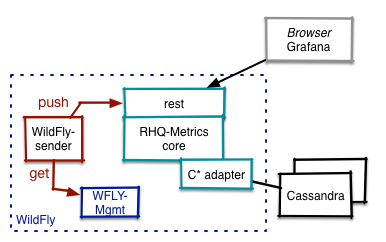
The following is a visualization of the setup:


Setup


The sender is running as a subsystem inside WildFly and reading metrics from the WildFly management api. The gathered metrics are then pushed via REST to RHQ-Metrics. Of course it is possible to send them to a RHQ-Metrics server that is running on a separate host.


The configuration of the subsystem looks like this:

<subsystem xmlns="urn:org.rhq.metrics:wildflySender:1.0">
<rhqm-server
name="localhost"
enabled="true"
port="8080"
token="0x-deaf-beef"/>
<metric name="non-heap"
path="/core-service=platform-mbean/type=memory"
attribute="non-heap-memory-usage"/>
<metric name="thread-count"
path="/core-service=platform-mbean/type=threading"
attribute="thread-count"/>
</subsystem>

As you see, the path to the DMR resource and the name of the attribute to be monitored as metrics can be given in the configuration.


The implementation is still basic at the moment - you can find the source code in the RHQ-Metrics repository on GitHub. Contributions are very welcome.

Heiko Braun and Harald Pehl are currently working on optimizing the scheduling with individual intervals and possible batching of requests for managed servers in a domain.


Many thanks go to Emmanuel Hugonnet, Kabir Khan and especially Tom Cerar for their help to get me going with writing a subsystem, which was pretty tricky for me. The parsers, the object model and the XML had a big tendency to disagree with each other :-)

Sunday, August 24, 2014

Alert definition templates in plugin(descriptor)s ?

Hey,

his is a more general question and not tied to a specific version of RHQ (but may become part of a future version of RHQ and/or RHQ-alerts).

Do you feel it would make sense to provide alert templates inside the plugin (descriptor) to allow the plugin writer to pre-define alert definitions for certain resource types / metrics? Plugin-writers know best what alert definitions and conditions make sense and should get the power to pre-define them.

This idea would probably work best with some relative metrics like disk is 90% full as opposed to absolute values that probably depend a lot more on concrete customer scenarios (e.g. heap usage over 64MB may be good for small installations, but not for large ones).
In the future with RHQ-alerts, it should also be possible to compare two metrics with each other, which will allow to say "if metric(disk usage) > 90% of metric(disk capacity) then ...".

I've scribbled the idea down in the Wintermute page on the RHQ wiki.

If you think this is useful, please respond here or on the wiki page. Best is if you could add a specific example.

Thursday, August 14, 2014

RHQ-Alerts aka Alerts 2.0 aka Wintermute

The RHQ-team has been thinking about next generation Alerting for RHQ for a while.

I have written my thoughts down in a blog post in the RHQ space of the JBoss
community site in order to start the (design) process:

Thoughts on RHQ-Alerts aka Alerts 2.0 aka Wintermute.

Please feel free to comment here or there :)

Tuesday, July 29, 2014

Java Forum Stuttgart 2014

tl;dr: Great as every year.

On July 17th, I attended the Java Forum Stuttgart conference, a one day conference with 49 talks in 7 tracks. This years edition marked a new record with 1600 attendees from all over Germany (and probably also from other countries).

Conference itself was awesome as every year with good talks and good food, 30+ exhibition stands and some free beer at the end :) The conference is organized by the Java User Group Stuttgart e.V. and as such is a non-profit event, which for sure partially explains the success.

I was lucky that my talk "Slim Fast" about a "diet for the application memory footprint" was accepted and I was positively surprised that the room was full despite the fact that the abstract did not contain any buzzwords like IoT or Cloud :-) (German) slides are attached to the above link, JUG Stuttgart now also has posted some pictures.

JUG Stuttgart also posted more pictures of sessions and also some general impression on their G+ page<./p>

Other talks that I've attended were:

"Java FX everywhere" by Gerrit Grunwald, who showed an app that he wrote for the desktop with Java FX and then ported over to devices like Raspberry PI, Android, iPad etc.

"Android ist anders - Android dependency management". This was about dependency management for Android - and for all those that blame Maven hell, check this out and you will like plain Maven afterwards :)

"IBM BlueMix". In this talk a guy from IBM explained a bit what BlueMix is and then demoed creating an app from a simple template and deploying it to a live BlueMix server in the cloud.

"TypeScript - JavaScript für Java Entwickler". Kai Toedter showed the TypeScript language as an alternative to JavaScript. While I was a bit skeptical about "yet another language", the talk totally made me change my mind and I can really see it as good alternative for future UI-work.


Sunday, June 15, 2014

RHQ-Metrics and Grafana (updated)

As you may know I am currently working on RHQ-Metrics, a time series database with some charting extensions that will be embeddable into Angular apps.

One of the goals of the project is also to make the database also available for other consumers that may have other input sources deployed as well as their own graphing.

Over the weekend I looked a bit at Grafana which looks quite nice, so I started to combine RHQ-metrics with Grafana.

I did not (immediately) find a description of the data format between Grafana and Graphite, but saw that InfluxDB is supported, so I fired up WireShark and was able to write an endpoint for RHQ-Metrics that supports listing of metrics and retrieving of data.

The overall setup looks like this:

RHQ metrics grafana setup
Setup used

A Ganglia gmond emits data over IP multicast, which is received with the protocol translator client, ptrans. This translates the data into requests that are pushed into the RHQ-metrics system (shown as the dotted box) and there stored in the Cassandra backend.

Grafana then talks to the RHQ-Metrics server and fetches the data to be displayed.
For this to work, I had to comment out the graphiteUrl in conf.js and use the influx backend like this:

 datasources: {
influx: {
default: true,
type: 'influxdb',
username: 'test',
password: 'test',
url: 'http://localhost:8080/rhq-metrics/influx',
}
},

As you can see, the URL points to the RHQ-Metrics server.

The code for the new handler is still "very rough" and thus not yet in the normal source repository. To use it, you can clone my version of the RHQ-Metrics repository and then run start.sh in the root directory to get the RHQ-Metrics server (with the built-in memory backend) running.

Update

I have now added code (still in my repository) to support some of the aggregating functions of Influx like min, max, mean, count and sum. The following shows a chart that uses those functions:

Wednesday, May 07, 2014

RHQ 4.11 released


I am proud to announce the immediate availability of RHQ 4.11.

As always this release contains new features and bug fixes.

Notable changes are:

  • Plugins can now define plugin specific DynaGroup expressions, which can even be auto-activated
  • Further agent footprint reduction for jmx-clients (especially if the agent runs on jdk 1.6)
  • Much improved agent install via ssh from the RHQ UI.
  • Support for Oracle 12 as backend database
  • New login screen that follows patternfly.org

As always RHQ is available for download in form of a zip archive. If you want to try out RHQ without too much setup, you can also use a pre-created Docker image
from https://index.docker.io/u/gkhachik/rhq-fedora.20/ (the link contains setup information).

Please consult the release notes for further details and a download link.

If you only want to have a quick look, you can also consult a
running RHQ 4.11 instance that we have set up. User/Pass are guest / rhqguest

Special thanks goes to

  • Elias Ross
  • Michael Burman

for their code contributions for this release.

My first Netty-based server

Netty logo
 

For our rhq-metrics project (and actually for RHQ proper) I wanted to be able to receive syslog messages, parse them and in case of content in the form of


type=metric thread.count=11 thread.active=1 heap.permgen.size=20040000

forward the individual key-value pairs (e.g. thread.count=11) to a rest endpoint for further processing.

After I started with the usual plain Java ServerSocket.. code I realized that this may become cumbersome and that this would be the perfect opportunity to check out Netty. Luckily I already had an Early Access copy of Netty in Action lying around and was ready to start.

Writing the first server that listens on TCP port 5140 to receive messages was easy and modifying /etc/syslog.conf to forward messages to that port as well.

Unfortunately I did not get any message.

I turned out that on OS/X syslog message forwarding is only UDP. So I sat down, converted the code to use UDP and was sort of happy. I was also able to create the backend connection to the REST server, but here I was missing the piece on how to "forward" the incoming data to the rest-client connection.

Luckily my colleague Norman Maurer, one of the Netty gurus helped me a lot and so I got that going.

After this worked, I continued and added a TCP server too, so that it is now possible to receive messages over TCP and UDP.

The (current) final setup looks like this:

Overviw of my Netty app

I need two different decoders here, as for TCP the (payload) data received is directly contained in a ByteBuf while for UDP it is inside a DatagramPacker and needs to be pulled out into a ByteBuf for further decoding.

One larger issue I had during development (aside from wrapping my head around "The Netty Way" of doing things) was that I wrote a Decoder like


public class UdpSyslogEventDecoder extends
MessageToMessageDecoder<DatagramPacket>{

protected void decode(ChannelHandlerContext ctx, DatagramPacket msg, List<Object> out) throws Exception {

and it never got called by Netty. I could see that it was instantiated when the pipeline was set up, but for incoming messages it was just bypassed.

After I added a method


public boolean acceptInboundMessage(Object msg) throws Exception {
return true;
}

my decoder was called, but Netty was throwing ClassCastExceptions, but they were pretty helpful, as it turned out that the IDE automatically imported java.net.DatagramPacket, which is not what Netty wants here. As Netty checks for the signature of the decode() and this did not match, Netty just ignored the decoder.

You can find the source of this server on GitHub.

Wednesday, April 30, 2014

Aerogear UPS alert plugin for RHQ


As already indicated, Matze Wessendorf and I sat together at Red Hat Summit and have created an alert sender plugin for RHQ that uses the unified push server from Aerogear to send alerts as push notifications to administrator phones.

For this to work you not only need to install the alert-sender plugin on RHQ side, but also have an appropriate application installed on your handset.

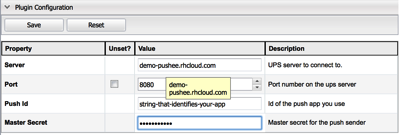
After you have installed the plugin in RHQ you need to go to Administration->Server Plugins and select the Alert:UPS entry. In the configuration settings you need to provide the host name where the push server lives, the secret to talk to it and also the id of your deployed handset app:

Bildschirmfoto 2014 04 30 um 09 24 53

After this is done, you can select this alert sender when you set up new notifications as with other senders:

Bildschirmfoto 2014 04 30 um 09 26 08

Right now this does not have any alert-specific settings, but I guess that in the future one could perhaps set the alert sound here for iOS devices or similar.

And after all this is done, the app is deployed and your handset is on, you could receive a push message just like this:

Screenshot

Screenshot of our first alert sent

If you want to have a look at the sender plugin, you can go to the RHQ repository on GitHub.

Saturday, April 26, 2014

RHQ and JBoss ON at Summit 2014

I was very fortunate to be able to attend this years Red Hat Summit in San Francisco.

Right before Summit, the accompanying DevNation conference already started on Sunday with some pretty interesting talks - among others about Fabric8 and Hawt.io.

As both Summit and DevNation happened at Moscone center, it was pretty easy to mix and match sessions. Dev Nation also featured a "hack area": some tables that had huge power strips in the middle to easily connect laptop and smartphone chargers. And usually the table were not as empty as on the next image:

I also met at one of those tables with Matze Wessendorf from the Aerogears team and we developed together an Alert Sender plugin for RHQ, that uses the Unified Push Sender to directly bring alerts from RHQ to the lock screen of the admins phones. The plugin only exists in private git at the moment. We need to do some polishing and remove some passwords before pushing to rhq git.

Summit presentation
Thomas Segismont and I did a presentation "What is new with JBoss ON" and we also had a BOF session later on.
The presentation ran well with around 60 attendees. Most of the audience already knew JBoss ON.
Of those around 2/3 are running 3.1, a few 3.2 and one person was even on 3.0 (unfortunately I was not able to find him later to find out why)

The slides of the presentation are already available online; unfortunately they do not cover the two live demos from Thomas, showing how to add a new Storage Node and how to make use of the new bundle permissions that were introduced in JBoss ON 3.2 (and also RHQ).

IMG 4188

Thomas at work and me doing a bit of talking.

BOF

The BOF/Meet and Greet session later was also quite well attended.
People had good questions and ideas and we were talking a bit about roadmap and also about some vision wrt. JBoss ON 4. Unfortunately we got kicked out the room much too early.

OCSystems
Thomas and I also had the luck to be invited by OCSystems, the makers of RTI that also runs on top of JBoss ON for a dinner at the Waterfront restaurant, from where we had an excellent view on to the bay bridge:

IMG 4163
Front row: Alan Santos, myself, Thomas Segismont

Middle: Tobias Hartwig, Bill Critch, all Red Hat

Behind: Steve North, Georgia Ferretti, both OCSystems

Hackathon

And last but not least at the Dev Nation Hackathon, Team "RHQ" won the 2nd prize with some "home automation":
a RaspberryPI running the agent had an LED blinking and we had also one of the MBed boards (Those are developer boards a little like Arduino but with an ARM cpu and sensors + an LCD on board)
connected to read in sensor data; unfortunately I lost some time at the start of the hackathon,
so we could not really use that info in the plugin; 1/2h more time and ... :-)
For the 2nd half of this, Thomas has built a Cordova application for his Android phone and showed how to receive push messages that were sent when alerts are fired with the brand new aerogear-ups alert sender plugin mentioned above.

I should have taken a photo of all the wiring we had set up, but totally forgot
about it.

I will re-create / finish this demo and blog about it


Thursday, February 13, 2014

Running the RHQ-agent on a Raspberry PI [updated]

I finally got a Raspberry Pi too. After the hurdles of initial installation, got it hooked up to my LAN and of course I had to install an RHQ agent on it.

And it turned out that this was dead simple, as the Pi already has Java 1.7 installed (in the Raspbian Wheezy distro that I am using). Thus it was only a matter of laying down the rhq-agent, and starting it the usual way.

Now there was one caveat: the agent did not find any file systems or network interfaces etc. This is due to the fact that there is no native library for Sigar on arm v6 cpus supplied with the agent.

I cloned Sigar from its git repository, changed into the 1.6 branch and built that library myself.

Now after dropping libsigar-arm-linux.so into the agent's lib/ directory, the native library is available and on agent restart all the native stuff could be found.

Screenshot of platform details in RHQ
(Platform details in RHQ)

If you don't want to compile that library yourself, you can take my version from https://sourceforge.net/projects/rhq/files/rhq/misc/.

I will try to get that library into the upcoming RHQ 4.10 release, but can't promise anything.

Update

If you run the agent from current master (or upcoming RHQ 4.10), you can configure a list of plugins to be enabled, so that the agent only uses these plugins (and thus uses less memory and starts faster).
This property can be found in the file conf/agent-configuration.xml:


<entry key="rhq.agent.plugins.enabled" value="Platforms,JMX,RHQAgent"/>

The entries are a comma separated list of plugin (short) names. To determine those, you can run
plugins info at the agent command prompt:


> plugins info
Details of the plugins that are currently installed:

rhq-agent-plugin-4.10.0-SNAPSHOT.jar
Plugin Name: RHQAgent
Display Name: RHQ Agent
Last Updated: 14. Februar 2014 11:03:35 MEZ
File Size: 51.558 bytes
MD5 Hashcode: f7eb7577af667ee4883437230e4b2d8c
[...]

Summary of installed plugins:
[RHQAgent, Platforms, JMX]

The short names are the ones encoded as "Plugin Name" and which are also shown on the summary line. There has actually been a property to disable unwanted plugins for a longer time, but just enabling the ones needed is probably easier.


The other thing you should do it to remove the -Xms setting in the rhq-agent.sh script- the default of a 64MB minimum heap is just too large here.

With those 3 plugins above and the removed Xms setting, my agent has a committed heap of ~14MB and a used heap of ~11MB. A dump is/was 4MB in size.

P.S.: “Raspberry Pi" is a trademark of the Raspberry Pi Foundation

Saturday, December 21, 2013

Money for nothing and memory for free: Java 7u40

I recently started playing with tools like MAT and also reading up about memory usage, performance (tuning) etc.

One of the interesting blog posts I came by was a comparison of JVM versions, that mentions that in 7u40, the default on how the JVM allocates the backing memory for ArrayList and HashMap has changed.

When you do

List<Foo> bla = new ArrayList<Foo>();

the VM will allocate memory for the base object and in vm versions prior to 7u40 also 10* 4bytes for the references to Foo objects, which (with alignment and so on) accounts to 80 bytes per empty ArrayList.

In 7u40, the array for the references is no longer eagerly allocated so that an empty ArrayList now only occupies the base 24 bytes, which account for 56bytes saving.

You may say so what, that are only 56 bytes, but remember that memory not allocated does not fill the heap, does not need to be garbage collected and also does not require memory bandwidth for the initial nulling out.

And so often an empty list/map does not come alone as in a case like this (output from MAT):

Screenshot 2013 11 15 17 51 25

With 225k empty ArrayLists, 56 bytes matter: 225k*56 bytes are 12 MB that you would save just by switching from a JVM pre 7u40 to 7u40 or later without a code change (of course not allocating those lists at all would save even more).

The situation for HashMap is similar: before 7u40 an empty one uses 136 bytes while in 7u40+ is uses 48, a saving of 88 bytes per empty HashMap or with the 235k empty HashMaps of the above example a saving of 20 MB.

Another (older) change is that in 7u06 the minimum size of String objects also has been reduced by 8 bytes, which matters a lot if you have millions of Strings in your VM.

Of course (as I've mentioned already) if you have access to the source code and can prevent the allocation of those empty objects altogether you would save even more memory.

Saturday, November 02, 2013

Back from OneDayTalk

[ I should have already written this a bit earlier, but I had some trouble with my left knee and had to go through some surgery (which went well). ]

As in the previous years I have been invited to give a talk at the OneDayConference in Munich. This year it was in a new location in a suburb of Munich called Germering. Getting there was easy for me, as there is a S-Bahn stop almost in front of the conference location.

The new location featured more and larger rooms and especially an area to sit down between talks or during lunch time. As in the last years the conference featured three parallel tracks.

As I said before I like that conference as everything is like a big family event with the organizers and also the presenters which featured many JBoss Colleagues; while I wrote that Ray would be there, Andrew Rubinger replaced him. The only talk that I really attended was the Wildfly one from Harald Pehl, which was full house. In the remaining part of the conference I talked to various attendees and colleagues from Jan Wildeboer to Gavin King and Heiko Braun. Heiko gave me an introduction about his (and Harald's) work to generate UIs from descriptors (which they use in the Wildfly console), which looks very interesting and where I think we could use some of that inside of RHQ to create "wizards" for several types of target resources.

In my talk, which was in the last slot, I had around 30 attendees (which was around 1/3 of the attendees still present). To my surprise I found out that the large majority did not yet know or use RHQ, so I had to switch from my original agenda and gave a brief introduction into RHQ first. Next I talked about the recent changes in RHQ and tried to gather feedback for future use case, but that was of course harder with attendees not knowing too much about RHQ. So much for "know your audience".

How do others try to find out their audience when the only thing they know is "This conference is all about JBoss projects" ?

You can find my slides in AsciiDoc format on GitHub that you can render via AsciiDoctor to html presentation.

Friday, November 01, 2013

Beware of the empty tag

I started playing with AngularJS lately and made some progress with RHQ as backend data source (via the REST api). Now I wanted to write a custom directive and use it like this:


<rhq-resource-picker/>
<div id="graph" style="padding: 10px"></div>

Now the very odd thing (for me) was that in the DOM this looked like this:


<rhq-resource-picker>
<div id="graph" style="padding: 10px"></div>
</rhq-resource-picker>

My custom directive wrapped around the <div> tag.

To fix this I had to turn my tag in a series of opening and closing tags instead of the empty one:


<rhq-resource-picker></rhq-resource-picker>
<div id="graph" style="padding: 10px"></div>

And in fact it turns out that a few more tags like the popular <div> tag show the same property of not allowing to write an empty tag, but requiring a tag pair.

Thursday, October 10, 2013

OneDayTalk conference in Munich

I will as in the previous years be at this years JBoss OneDayTalk conference in Munich and talk about recent and future developments in RHQ.

OneDayTalk is a pretty nice little conference organized by the JBoss User Group Munich, that offers three tracks with 6 sessions each, where I usually have the problem that I can't divide myself into three to visit them all. And for 99 Euro you also get some good food and many opportunities to meet myself and other JBossians like Eric Schabell, Gavin King, Emanuel Muckenhuber, Heiko Braun or Ray Ploski. The conference web site has the full listing of speakers as well as the scheduled program.