Friday, August 15, 2008

RHQ monitor arbitrary JMX servers (Eclipse as example)

While RHQ is focusing on providing specific resource types with specific operations and metrics on them, it is possible to just connect to any JMX server (actually that code is in SVN Head as of today).

This example will show you how you could use this to e.g. monitor your Eclipse instance. This basically consists of two steps:
  • instrument the target app -- Eclipse in this case

  • manually add a JMX server to the RHQ inventory


Step 1: instrument Eclipse


Add the following to eclipse.ini:


-Dcom.sun.management.jmxremote

-Dcom.sun.management.jmxremote.port=10000


as we don't want for this example password authentication and ssl (of course you should do that for production, but we want to concentrate on how to initiate the connection at all), we disable it by supplying


-Dcom.sun.management.jmxremote.authenticate=false

-Dcom.sun.management.jmxremote.ssl=false


and restart Eclipse afterwards.

This page at Sun explains the various options for JMX remoting in JDK5.

Step 2: Manually add a JMX server in RHQ


Go to the inventory tab of the platform and select "Manually Add": "Jmx Server" below the list of child resources. Press OK

JMX_add_1.png


On the next screen select "JDK 5" from the drop down and continue:

JMX_add_2.png


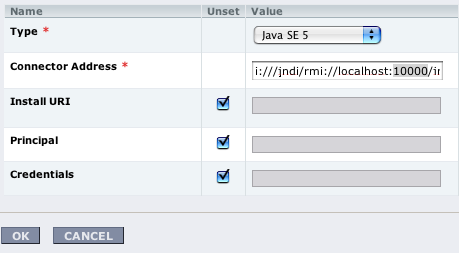
The following screen will show prefilled connection properties - here we need to set port 10000 from above:

JMX_add_3.png


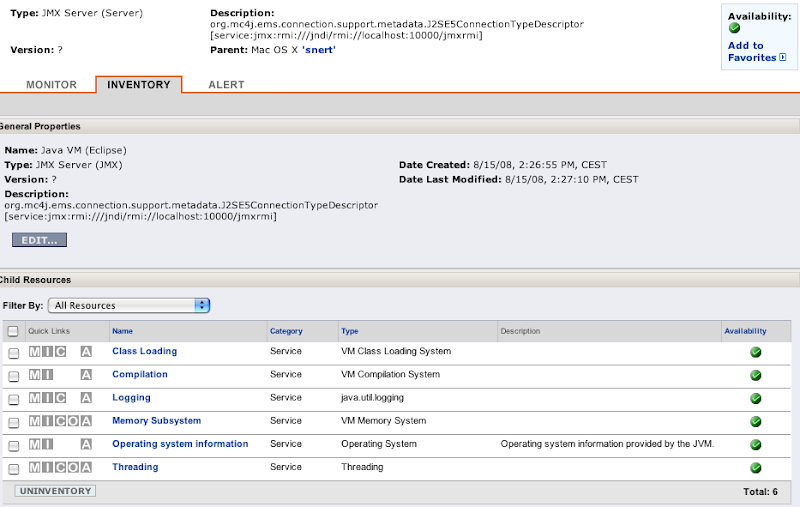
Click on OK and the new Java VM should appear. After some waiting, you will see the inidividual MBeans as you know it from other services in RHQ:

JMX_add_4.png


Technorati Tags:
,


RHQ server HA work

We have started to bring High-Availability to the RHQ Server. This is targeted for the upcoming 1.1 release later this year.

The installer has been updated to support HA and in the administration screens you will find a new section on High Availability, that lists the servers in a server cluster:

HA_servers_list.png


You can check this out and directly follow it in SVN head.

Wednesday, August 13, 2008

New version of iTunes Remote Control (iTRC)

The latest update of iTunes introduced an incompatibility with iTunes Remote Control, so ITRC did no longer work.
James is fortunately providing an updated version of iTRC that fixes the issues.
You can grab v1.4.1 from iTunes Remote Control.

Thanks James!

Monday, August 11, 2008

Visit to Legoland

Two weeks ago we've been in Legoland Günzburg, which is around 1.5h away from Stuttgart (by car; Günzburg is also reachable via train).
Parking and entrance was no problem. We had tickets that we ordered over the internet and printed them by ourselves. At the gates, those got just scanned in, so there was no waiting in line.

IMG_3704.jpg


Behind the entrance Orlando did for the first time not run away from a dog, but even approached it and patted it:

IMG_3706.jpg


First station was the little express train which does a tour thorough the park which enabled us to get an overview. Unfortunately this has been our first 10 minutes wait on the day with more to come (in total the park was not full and wait times were not too bad).

Next we went through Miniaturland (a landscape with different scenes, all in 1:20 scale). And this really was one of the greatest parts of Legoland. Not only we enjoyed it, but Marlene was totally excited. Whenever she saw a moving car in it, she exclaimed "Da!" ('There') and pointed to it. I think she could have been there for hours.

IMG_3724.jpg

(Rialto bridge from Venice, Italy)

IMG_3726.jpg


IMG_3727.jpg

(Brandenburger Tor, Berlin, Germany)

After this we went to lunch to the Dino-Grill. On the next picture you'll see some typical food here :-)
IMG_3734.jpg


Otherwise Legoland featured some wild animals:

IMG_3738.jpg


IMG_3751.jpg
IMG_3804.jpg


Knights on their horses:
IMG_5873.jpg


Driving schools:
IMG_3800.jpg


And a lot of other tourists:
IMG_3823.jpg


The kids really liked the visit to Legoland and Orlando is very willing to go there soon again. Actually as he was rejected at two places for being to small, he is even now drinking milk to accelerate his height growth.

Thursday, August 07, 2008

Don't be afraid to use a profiler

While developing on RHQ I encountered several situations where things were slow. One starts to look at the code, add a few print statements here and there and tries to guess what it happening.
Running the whole show through a debugger usually also doesn't help as digging deep into method calls will let you run into transaction timeouts from which point on, results are just useless.

Luckily there is a different sort of debugging help: Profilers like jProfiler from ej-technology, the one built into NetBeans, TPTP in Eclipse and others.

Profilers like jProfiler give you a few different ways to look at your application. For this discussion about performance, I will concentrate on the cpu usage part, as this is the most relevant for our case.
But actually (and this is what my presentation at Java Forum Stuttgart was about) they also make very nice debugging helpers.

Differentiation Profiler vs. Debugger


Before I dive deeper into the subject, I want to give a sort differentiation between profiler and debugger.

Debugger


  • Stepping through individual statements of the code
  • Stops the execution, so not for production use
  • Allows to see the content of individual variables
  • Hard to see the root cause of slowness, as this might be deep down in used libraries.


If the application code you want to step through is large, you will most likely run into transaction timeouts, which renders all results invalid.

Profiler


  • Application runs normally (but slower)
  • No way to see individual variable content
  • Easy way to get call graphs through the application


How to tackle the issues


Suppose you want to participate in RHQ and ask yourself "what happens if I click here?"
RHQ_gui.png


With a debugger this is hard do tell. You could search through the code for this string. And then try to find out if this is a Struts-page or a JSF page or you could look at where this link is pointing to and try to determine the resulting page from this.

With a profiler the steps could be as follows:


  • Instrument the RHQ server with in a profiler specific way (have a look at the profiler vendors manual)
  • Start the application and navigate to the above page
  • Start the profiler and start profiling CPU usage
  • Click on the link
  • When the result page is rendered, stop CPU profiling
  • Start looking at the timing tree as outlined below


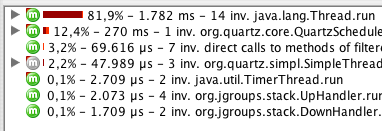
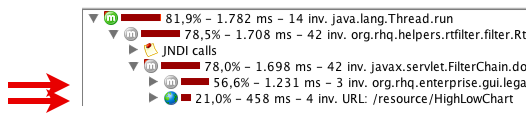
CallTree1.png


Generally open the node with the most CPU usage (Thread.run, the top line here).

This will give a subtree view like this:

CallTree2.png


Here we see that the CPU time is spent in 3 invocations of some org.rhq.enterprise.* method and also in 4 calls to a HighLowChart. Here we are interested in the org.rhq code, so we open this subtree:

CallTree3.png


And we see that those 3 invocations are actually 3 individual Struts actions. From here on it is easy to dive into them by either just opening the tree nodes again or by looking them up in struts-config.xml

Repeated invocations


Now that you know where time is spent, you want to improve the methods. Always going from the top can be tiring. Most profilers allow you to limit the display to just one method and its children.

Also its possible (at least with JProfiler) to add a trigger, that fires and starts profiling when a certain method is called and stops when the path of execution leaves this method again.


RHQ - tip of the day: Agent waiting at startup

Sometimes when you start the RHQ agent (on commandline), it will not proceed to the sending> prompt, but sit there and wait for something. This post will talk about some of the possibilities.

The server has rejected the agent registration request...


Well, this message from the agent actually goes on:


Cause: [org.rhq.core.clientapi.server.core.AgentRegistrationException:The agent asking for registration is trying to register the same address/port [172.31.7.7:16163] that is already registered under a different name [snert]; if this new agent is actually the same as the original, then re-register with the same name]


This means that the connecting agent is known as 'snert' to the server, but it was passing a different name to it on this start.

To solve this, start the agent with option --clean and give the correct name.

The agent will now wait until it has registered with the server...


By default (well, you had to answer the questions on about it), the communication ports for server-agent communication are as follows (yes, two unidirectional connections):

  • Agent to server: server is listening on port 7080

  • Server to agent: the agent is listening on port 16163


... and hangs there


This is an agent state where the server can not be reached (perhaps because it is down or because a firewall blocks the traffic.
So make sure port 7080 on the server machine is reachable from the agents machine. You can simply do this with a web browser like Safari or lynx or wget.

... and shows an additional error


Here, after a little time the agent will show a message like this:

The server has rejected the agent registration request. Cause: [org.rhq.core.clientapi.server.core.AgentRegistrationException:Server cannot ping the agent's endpoint. The agent's endpoint is probably invalid or there is a firewall preventing the server from connecting to the agent. Endpoint: socket://172.31.7.3:12345/....

This means that the agent was able to talk to the server (so this communication channel is ok), but
the other direction is failing. In the example above, the server was trying to reach an agent on IP 172.31.7.3 and TCP port 12345, which was probably blocked in the firewall.

The agent does not have plugins - it will now wait for them to be downloaded...


This usually means that the server has a different security token than the one the agent was sending.
This could come from the fact that the java preferences entry got mangled e.g by testing with different agent versions or VMs or ...

You will see this message only on initial agent startup when it does not have any plugins yet.
If plugins got downloaded in a previous run, you will probably run in the situation shown below.

If you see this on the agent, you should also see messages like this on the server side:

11:40:48,454 WARN [CommandProcessor] {CommandProcessor.failed-authentication}Command failed to be authenticated! This command will be ignored and not processed: Command: type=[remotepojo]; cmd-in-response=[false]; config=[{rhq.security-token=1217855913569-109582636-403140853869881172, rhq.send-throttle=true}]; params=[{targetInterfaceName=org.rhq.core.clientapi.server.core.CoreServerService, invocation=NameBasedInvocation[getLatestPlugins]}]

To solve this, start the agent interactively with the --clean option.

Agent startup is ok, but ping command fails


Here, the agent successfully starts, but you will e.g not see any new metric data coming in from this agent. When you give the ping command on the agent command line you will see something like:

sending> ping

Pinging...

Failed to execute prompt command [ping]. Cause: org.rhq.enterprise.communications.command.server.AuthenticationException:Command failed to be authenticated! This command will be ignored and not processed: Command: type=[remotepojo]; cmd-in-response=[false]; config=[{rhq.security-token=1214208960346-102975580-7334156733284942657, rhq.send-throttle=true}]; params=[{targetInterfaceName=org.rhq.enterprise.communications.Ping, invocation=NameBasedInvocation[ping]}]


This is basically the same as above. Your server log should also be full of those CommandProcessor.failed-authentication messages. Solution as in the previous section.


Tuesday, July 29, 2008

Netbeans: where is the servlet-api?

I am currently writing a sample servlet for x2svg. And I am also trying to use NetBeans for it (as you probably remember, I am normally using Eclipse for my daily work). Actually I even downloaded 6.5M1 as Adam Bien sounded enthusiastic about it (and the editor really feels somewhat snappier than the 6.1 one).

To be able to include javax.servlet.* I need the servlet-api.
So I went to Tools->Libraries and expected it to be there. I have downloaded the EE edition of NetBeans, that should have it, but I just can't find it. There are tons of stuff like JSF libs etc. that all depend on it in some way, but I can't just pull in the basic servlet api.

For now I ended up with including the external servlet-api jar from tomcat, but this can't be the real solution.

What am I doing wrong? Where is the servlet-api in the NetBeans distribution?

Sunday, July 27, 2008

First 100km

As I indicated in this post I have started running again some weeks ago. Now after around 7 weeks, I crossed the 100km barrier (so this makes 15km per week on average, in 2 sessions on average per week).

Lets see if I will stay motivated to do the next 100km also in 7 weeks or less.

One of my big motivational factors is clearly Trailrunner, a very cool desktop app for the Mac to file each run in a training diary and to graphically select routes and compute distances etc. It's really fun to select new routes to run.
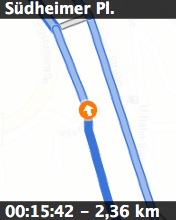
Trailrunner is even able to create images from the route
Daheim73-04.jpg


that can be uploaded to an iPod or a mobile phone as a miniature map to go (the image shows on top the name of the way-point and on bottom the expected target time (*) and the distance from the start). Also the map data (from various map sources can be shown on those micro maps)


*): One can set an expected speed for each route which is used to compute the expected time for each way-point; this helps to adjust the running speed while on the go.

It's no full blown GPS navigation (which seems to be supported with more sophisticated devices like the Garmin Forerunner), but is very helpful when running a new track for the first time.

Saturday, July 26, 2008

Why conference calls fail (2)

RHQ plugin descriptor development - and validation in your IDE

When writing a plugin for RHQ, one has to write the plugin descriptor. While this is not complicated, it still leaves some room for errors.
The good thing (but you will hate it, when you run into it) is that when deploying the plugin, its descriptor will be validated against the defining XML Schema - and errors will reported.

Of course, you could just have a look at the structural diagram of the second part of my plugin development postings, but this doesn't really make the task of writing XML easier.

The elements of the plugin descriptor are encoded in two XML Schema files in the source code:

  • urn:xmlns:rhq-plugin : rhq/modules/core/client-api/src/main/resources/rhq-plugin.xsd
  • urn:xmlns:rhq-configuration : rhq/modules/core/client-api/src/main/resources/rhq-configuration.xsd


Which means for you, that you can use the Schema files too for validation in your IDE. The following sections show how this is done; as my base install path of the RHQ project is in /jon/jonHEAD, this path will be prepended in the examples.

Eclipse 3.3


Go to Preferences->Web and XML->XML Catalog.


IntelliJ 7


Go to Setup->Resources and enter the urn and the path. So it might look like this:


NetBeans 6.1


Go to Tools->DTDs and XML Schemas. Then select the User Catalog and click on Add Local DTD or Schema. This might look as follows:


Sunday, July 20, 2008

RHQ snmptrapd updated

Since I have created the SNMPtrapd plugin for RHQ, I have updated it with a lot of little features and corrections:


  • The listner port can be configured via gui

  • A severity oid can be configured via gui: if a varbinding with this OID is received, then it is taken to compute the even severity

  • It correctly binds and unbinds to its listening socket

  • OID to text mapping: As I am still looking for an open source MIB that fits my needs and that where development is active, I've added the possibility to put mappings of oid to text in a properties file

  • Sender address is not only for V1 traps computed

  • More information about V1 traps are put extracted and put in the resulting event.


The plugin is in SVN and its description is on the plugin wiki (which also has the link to SVN etc.).

Thursday, July 17, 2008

RHQ plugin dev - api docs online

When you want to develop a plugin for RHQ,
you can of course follow my plugin dev series. But in most cases you probably want to know more.
Of course, as RHQ is open source, you can just look at the source. Most of the time it is more convenient though to just browse api docs.

JavaDoc for plugin development is now available - check it out. The docs are for RHQ version 1.0.1.

If you have questions, join us in #rhq on irc.freenode.net or post in the RHQ forums.

Tuesday, July 15, 2008

The reorg

This is one that I had in mind for quite some time now. Actually I even had it on paper and scanned in a few years ago, but lost both versions.

I've drawn the original version directly after coming out of a meeting, as this was the only thing I was able to think of after that meeting.


Sunday, July 13, 2008

x2svg 1.2.1 released


I have just released version 1.2.1 of x2svg, a tool to render input graphs as svg and to convert the created SVG (actually any SVG) into other formats like PNG or PDF.

This release consists of two changes relative to the previous one:
  • Lines have shadows now

  • Fixed a bug, where straight lines had 'steps' in them


As usual, you can download the release from sourceforge.

Friday, July 11, 2008

Thursday, July 10, 2008

RHQ and x2svg on ohloh

RHQ and x2svg have lately been added to the list of projects on ohloh.net - if you are a user of said software, please consider passing at ohloh and to click on the "I use this" button.

Direct links to the projects:


Unfortunately, Ohloh can't know that we already were working on RHQ before open sourcing it in February 2008, so it thinks its history is still relatively short.

Tuesday, July 08, 2008

Experimental Snmp trapd as event source for RHQ (+ comments about Event polling)

I have just committed an experimental SNMP trapd plugin for RHQ. Currently it is only able to listen for V1 traps at a fixed address, but I am sure this will change :)
Incoming traps will be forwarded as Events into the events subsystem, so you can view them in the GUI and even define alarms on them (that trigger SNMP traps :-)

The plugin has its own page within the RHQ plugin community pages. This page also shows the location in SVN. The plugin is marked as experimental, meaning that it is not linked in the parent pom. To build it, you need to go into the plugin base directory and build from there.

Events processing


This plugin is also an example for processing of Events. In addition to the three components that you already know from my plugin development series, you need an EventPoller - that is a class with a method that gets called at regular intervals and which pulls the event data in. Lets have a look at the Component class, the plugin descriptor and the Poller. As the discovery component more or less follows what you have seen in part 3 of the series, I am not going to show this again.

Plugin Descriptor


The plugin descriptor is mostly as we know it. There is now one new element:


<event name="SnmpTrap" description="One single incoming trap"/>


The important part here is the name attribute, as we will need its content later again. The name is the key into the EventDefinition object.

Plugin Component


In the plugin component, we are using start() and stop() to start and stop polling for events:


public void start(ResourceContext context) throws
InvalidPluginConfigurationException, Exception {
 
eventContext = context.getEventContext();
snmpTrapEventPoller = new SnmpTrapEventPoller();
eventContext.registerEventPoller(snmpTrapEventPoller, 60);


So first we are getting an EventContext from the passed ResourceContext, Instantiate an EventPoller and register this Poller with the EventContext (60 is the number of seconds between polls).
The plugin container will start its timer when this registration is done.

In stop() we just unregister the poller again:

eventContext.unregisterEventPoller(TRAP_TYPE);

TRAP_TYPE is the ResourceType name as String - we will see this again in a second.

The remainder of this class is nothing special and if you have read the plugin development series, it should actually be no news at all.

Event Poller


This class is the only real new piece in the game.


public class SnmpTrapEventPoller implements EventPoller {


Implementing EventPoller means to implement two methods:


public String getEventType() {
return SnmpTrapdComponent.TRAP_TYPE;
}


Here we return the content of the name attribute from the <event> tag of the plugin descriptor. The plugin will not start if they don't match.

The other method to implement is poll():


public Set<Event> poll() {
Set<Event> eventSet = new HashSet<Event>();
...
return eventSet;
}


To create one Event object you just instantiate it. The needed type can just be obtained by a call to getEventType().


That's all


Well, that's all. Source is in the RHQ subversion repository - go and check out the sources yourself.

Feedback is always appreciated.


Technorati Tags:
, ,

Friday, July 04, 2008

RHQ 1.0.1 binaries are available from SourceForge

We were finally able to provide binaries of RHQ 1.0.1 next to the source which has been available since February.

You can find the download instructions in the RHQ wiki

Remember: you can reach us in #rhq on irc.freenode.net or via the forums.

JavaForumStuttgart 2008 (subjective review)

Yesterday I was at 11th Java Forum Stuttgart (JFS), a regional Java conference with 1100 attendees(!). The JFS featured 42 sessions in 6 parallel tracks in one day. This conference is very popular and attendees came from all over Germany. As last year, the conference took place in the Liederhalle, which offers much more space than the place the JFS has been in the years before.

I also had a talk about "Profiler, the better debugger?". The talk went well - I had around 250-300 attendees, that stayed in the room :-) I was going through some slides and then showing live examples about how to dig into unknown software with the help of the profiler.

Of course I took RHQ as example, even if it was not that unknown for me :-) After the session I got some feedback that people liked the talk and one ex-colleague told me that he is currently having the problem to dig into more or less unknown software, so that this exactly fits his needs.


There have been two talks about JBoss products / projects:

  • Advanced JBoss Cache (Carsten Mjartan): I was briefly in this session to take some pictures, but left early again, as I already know a lot about JBoss Cache, so this was no big news for me.


  • Geschäftsprozese und -regeln mit jBPM und Drools - ein unschlagbares Team (Bernd Rücker): I also know a little about this, but as I was the moderator, I had to stay :-) Seriously: Bernd gave a good talk in front of ~300 attendees about what is BPM and BRM and how you can combine jBPM and Drools.


One of the highlights shurely was the talk by Erich Gamma (about Jazz)- my talk was unfortunately at the same time, so I was not able to attend it :-(

Red Hat also had a booth at JFS:


Later in the evening there have been some BOF sessions - I have a BOF about RHQ - basically the same thing as in the SIG-JBoss meeting a week ago.

You will find the slides of my talk at the JFS pages. The slides of the BOF can be found

After the talks, there was food and free beer sponsored by IBM - and Gee Hye Lee was nicely playing piano for us.


The JFS featured good content and good food as usual, so mark the date in your calendar for next years conference:-)


Monday, June 30, 2008

RHQ 1.0.1 and JBossON 2.0.1 available


We just released RHQ Version 1.0.1 and JBossOn 2.0.1 in the wild.

Both are bugfix releases and don't add much of new functionality (read: "as in new subsystems") - if you want you can have a look at the closed JIRAs. You will also find a few new features in there :)

You can find the RHQ 1.0.1.GA tag in RHQ svn.

JBoss customers can of course download JBossON 2.0.1 from the customer support portal as usual.

As usual, it is cool to get a release out of the door :-)


Friday, June 27, 2008

Yesterday SIG-JBoss-Meeting about RHQ

Ok, I have to admit, that yesterday wasn't the best day to run a SIG-JBoss meeting
of the Stuttgart Java User Group, as the second semi final of the European Soccer Championship was also yesterday. But then we have seen all three goals on the big screen in a nearby Italian restaurant after the meeting anyway.

In the meeting I went a bit through what RHQ is, how it relates to JBossON, showed the components and then just did a live demo of the whole system.

After that we went through what it takes to develop plugins and showed some code (Yeah man, show me the code :-)

Conclusion was that RHQ, even if still lacking things is already very powerful and that the agent and server infrastructure does a lot for you for free.

My slides can be downloaded here (PDF, German).

If you are interested in RHQ, you can also pass by at the Red Hat booth at Java Forum Stuttgart, where I may be able to demonstrate that (or one of my colleagues).

Wednesday, June 25, 2008

RHQ - tip of the day: Which groups are containing a resource

RHQ has a powerful grouping feature: you can generate groups of resources (of compatible and mixed type).

When you go to the Browse Resources page, you can get a list of compatible and mixed groups and from the inventory of a group see all members of said group. Setting up a lot of groups is even easier with the cool DynaGroups feature.

But what if you want to know all groups that contain a certain resource? Of course, you can look into each group and check if it is there. But this can get boring with lots of groups.

There is an easier solution to that: go to the inventory page of the resource and scroll down. You will find a section "Groups Containing this Resource":


This section shows the names and types of groups where the resource is in, as well as member count and availability of the group.


Technorati Tags:
,


Tuesday, June 24, 2008

RHQ - tip of the day: postgres and login permission

When creating a database and database user for RHQ, Postgres knows two commands to create a user:

create user
and
create role

They both do the same thing and create a database user. The big difference (which may cause you some grey hair) is that create role does not automatically allow log in.

So to create a database user for RHQ, use the create user form. Example:

create user rhqadmin password 'rhqadmin'

If you have further login issues, see also my other posting about "local is not local"


Technorati Tags:


Monday, June 23, 2008

RHQ - tip of the day: is the resource down or the network?

RHQ and JBossON 2, that is built on top of RHQ are distributed systems. The agents managing resources can (and will) live on a different system than the server. So sometimes the question arises when a resource is marked as unavailable if the resource itself is down - or the connection between agent and server.

There is a heartbeat going on between the RHQ agents and the server: the agents are periodically reporting the availability of their managed resources to the server. Now if the server doesn't get those reports for some time, it will report the managed resource as being down. This might have three causes

  • The resource is really down
  • The agent is down
  • The network between agent and server is down
  • Combination of the above


So if a resource is down and you are not sure, go to its inventory tab and scroll to the bottom. There is a section "Agent Managing this Resource":


This shows the availability of the agent and when the last availability report for this resource was received.

If this one shows red, you really should have a look at the machine hosting the agent and the resource.


Technorati Tags:
,


Stuttgart-Lauf

Yesterday I was at the Stuttgart-Lauf again. The track was a little bit longer with 8.2 km than in previous years with 7.6 km.

My result:


Actually I am quite happy with that, as I did not exercise a lot before and the weather was again very hot (32 Degrees Celsius). In my category (age 30-39), there were 425 finishers. Total finisher according to the stats at Mika Timing were 3664 ppl.

The run was fun again, because of the people along the track and also the finish in the Gottlieb-Daimler-Stadion. I think this time was the last time that the finishing line is in the stadium, as there are plans to convert it into a soccer-only arena.

Friday, June 20, 2008

RHQ - tip of the day: Use the skeleton generator to generate plugin skeletons

I wrote in length about writing plugins for RHQ - of course there is still more to know about.

That is why we created the plugin community.

One cool new feature since writing the blog series is the new plugin skeleton generator, that Jason Dobies wrote. While the name of (the generator, not of Jay :-) is a little complicated ("RHQ Plugin Archetype") you don't need to be afraid :)
It is just a maven command that will create all you need.

To use the archetype you first need to download it as indicated on its wiki page.

Then you call it as follows (I am using multiple lines here, but on the shell you need to give that in one line).


$ cd $RHQ/modules/plugins
$ mvn archetype:create -DarchetypeGroupId=org.rhq \
-DarchetypeArtifactId=rhq-plugin-archetype \
-Drhq-plugin-name=test \
-DarchetypeVersion=1.0.0.GA \
-DartifactId=rhq-test-plugin \
-Dversion=1.0.1-SNAPSHOT \
-Dpackage=org.rhq.plugins.test \


This will emit a lot of stuff ending in:

[INFO] Archetype created in dir: /jon/jonHEAD/rhq/modules/plugins/rhq-test-plugin


Note that the version in the -Dversion attribute above must correspond to the version of RHQ that you are using to build the plugin. Otherwise compiling of the plugin will fail.
All options are described on the wiki page. Basically you need two things: artifactId, the name of your plugin, and package, the java package of it.

One caveat: currently (as of 6/20) it is only generating the base directory structure and plugin descriptor, but no Java files. But I am very sure, Jason will fix that soon. And hey, this is open source and the source code is available from svn.

Have fun -- and join us on irc://irc.freenode.net/ in channel #rhq.


Technorati Tags:
, ,


Thursday, June 19, 2008

Java is finally free and open

My colleague Rich Sharples just blogged about it. But as this is so important, it needs to be repeated :-)

So: IcedTea passed the Java TCK. You can get it today in Fedora 9.

See also:

http://digg.com/software/Java_finally_open_and_free

Lilian Angel on IcedTea

IcedTea at Wikipedia

RHQ - tip of the day: Try JBoss ON 2

You surely know by now: JBossON 2 is built on top of RHQ.

JBoss is now providing a free trial version of JBoss ON 2 at http://www.jboss.com/products/jbosson. Sign up at the link provided there and see JBoss ON 2 in action. This also includes plugins for monitoring JBossAS

Support for that trial is through the forums at http://www.jboss.com/index.html?module=bb&op=viewforum&f=285.


Technorati Tags:
,


Reminder: Stuttgart SIG-JBoss meeting about RHQ

This is a reminder about the upcoming Stuttgart SIG-JBoss meeting.


The Stuttgart SIG-JBoss will hold a meeting on June 26th in the premises of Red Hat Germany.

Topic for this meeting is a presentation of RHQ -- and if we have time about how to write plugins.
If you want, bring your laptops, so we can do some installations and fun stuff.

You can view the full (German) announcement at the Stuttgart Java User Group page

Please register as indicated in the announcement page -- registration is free!

Remember: parking space is limited in the vicinity of the office, but U1,U14 and bus 44 stop directly in front of the office.

Wednesday, June 18, 2008

Postgres: local is not local (or how to solve connection issues)

When setting up RHQ and doing some testing around an open bug report, I stumbled once more over the PostgreSQL access configuration. Usually I just configure it and it works, but this time it just did not do what I wanted it to do ... It is not that it is not documented, but as I have seen others fighting here too, I will comment a little.

PostgreSQL use two files that configure who can access the database. The first one, postgresql.conf defines the network interfaces, PostgreSQL is listening on:


#listen_addresses = 'localhost' # what IP address(es) to listen on;
# comma-separated list of addresses;
# defaults to 'localhost', '*' = all


If this line is commented, as shown it will only listen on TCP sockets on localhost (127.0.0.1) for
IPv4 and IPv6(!) and additionally on a unix domain socket.
If you want to give access to people from another computer, you need to uncomment the listen_address entry and list the respective network interfaces to listen on. Then restart the PostgreSQL server.

The second file is pg_hba.conf. It contains the specific about which user may access which database with which way of connecting and authentication:

# TYPE  DATABASE    USER        CIDR-ADDRESS          METHOD
 
# "local" is for Unix domain socket connections only
#local all all trust
local all all md5
# IPv4 local connections:
host all all 127.0.0.1/32 md5
# IPv6 local connections:
#host all all ::1/128 trust


When you connect to the database via psql, you are by default using a unix domain socket connection - so the line starting with "local" applies.
If you try to connect via a JDBC driver, as RHQ and JBossON do, the connection will be done via TCP, which means the lines starting with "host" are applicable.

So even if you are successfully able to connect to Postgres via psql, it does not mean, that you can do so via other means or from remote hosts.

So how can you verify the connection setup without first starting your java app? Well, psql allows you to supply a hostname -- if this is there, it will use a TCP connection. Note that if you specify
-h localhost, the connection could go over TCPv6. To force the use of TCPv4 use -h 127.0.0.1.

With the above pg_hba.conf this could look like this:

snert$ psql -h localhost -Urhqadmin -d rhq
psql: FATAL: no pg_hba.conf entry for host "::1", user "rhqadmin", database "rhq", SSL off

This is ok, as the line for ::1/128 was commented out

snert$ psql -h 127.0.0.1 -Urhqadmin -d rhq
Password for user rhq:
Welcome to psql 8.3.3, the PostgreSQL interactive terminal.
rqh=>

Now we succeeded.


Technorati Tags:


RHQ - tip of the day: manual resource discovery

RHQ and JBossON 2 have both the possibility to automatically discover managed resources (see e.g. this posting for some details).

This autodiscovery is running at regular intervals. But sometimes you want to directly add a new managed resource like a freshly installed JBossAS server to your inventory. There are basically two possibilities (besides just waiting for the next autodiscovery to happen):


  • Trigger a manual autodiscovery on the server

  • Give a prompt command on the agent


Lets have a short look at both...

Trigger a manual autodiscovery on the server


In the RHQ-GUI go to the Operations Tab of the platform (=The machine) on which you started the new JBossAS server and click on "Manual Autodiscovery":


On the next page, select "Yes" for detailed discovery and click on "Schedule" below. This will take a few seconds and the just submitted operation will be shown in the history view. When it has finished, go to the Dashboard.

Give a prompt command on the agent


If you have your agent running in foreground and still have the agent commandline available, you can just issue a discovery --full command.

sending> discovery --full
Full discovery run in 4659ms
sending>


When the sending> prompt is back, go to the Dashboard in the GUI.

And Import ..


After you have discovered your resources, you still need to import them into inventory. To do this, go to the Dashboard and the autodiscovery portlet, that will show the resources you just discovered. Click on "Import" as usual:


(Screenshot was taken in JBossON 2)


Technorati Tags:
,


Tuesday, June 17, 2008

RHQ - tip of the day: Metric display is steady

In RHQ and JBossON 2, that is built on top of RHQ,
you have the possibility to graph metrics for (more or less) arbitrary time ranges.

But sometimes the display is not moving and not showing any data that you'd expect to see.

If this is the case, have a look at the time range setting, which are below the graphs:


Here it is fixed to a 1 hour interval between 10:31am on jun 16th to 11:31am on the same day.
This means that RHQ will all over the place only show metric data for this 1 hour timerange.

To get things "dynamic" again, just select the "Last x hours" radio button and click on "redraw".


Technorati Tags:
,


Monday, June 16, 2008

RHQ - tip of the day: sync your clocks

RHQ and JBossON 2, that is built on top of RHQ are distributed systems. The agents can (and will) live on a different system than the server.

Metric data that is gathered on the agents will be sent to the server and stored in the database. Now if you want to e.g. compare metrics from two different sources (e.g. the load of two JBossAS servers in a cluster), you can only make sense out of it when the metrics have been taken at the same time (a few seconds usually don't hurt, but if it is more, you will see a peek on one server at one time and a peek on the other server at the other time. This will make you wonder why your load balancer was distributing the load in strange ways. In reality the peeks were at the same time and the system was working as it should.


In the above image you see on the left side two peaks that obviously are not occurring at the same time. On the right with synchronized clocks, you see that those peaks, even at different level, occurred simultaneously.


Another issue that we have seen in the past is that metrics were not showing at all on the GUI and users were thinking that something is broken or that the agent did not collect data (especially directly after install). The cause to that was that that the agent clock was so far in the past or in the future that its values just well outside of the displayed time range.


You won't see metric data of an agent after it started when its clock is 2h away from the master clock with this setting of a display range of 1 hour.


Technorati Tags:
,


Friday, June 06, 2008

Good SIG meeting about jBPM (updated)

[ update: it is not jBPM 3.3 as I have written previously, but rather 3.2.3.
Also I added a link to the slides and the specific pages on the camunda home page ]


Yesterday we held a SIG JBoss meeting within the Java User Group Stuttgart.
Bernd Rücker from camunda gave a presentation about Business process simulation with jBPM.


First he introduced into business process management itself and then into jBPM, which was good as most of the over 20 attendees did not yet know about it.


Afterwards he was talking about statistics and simulation basics, how he married DESMO-J with jBPM and showed a live demo.

And you know the best?
His work has been committed to the jBPM repository, so version 3.2.3 (if it gets ever released) will contain it.

I would also like to thank Red Hat Germany for providing the location for that meeting.

The slides are available at http://www.camunda.com/content/publikationen/ruecker-jbpm-simulation.pdf

Introduction into BPS with jBPM

jBPM home page