Showing posts with label Eclipse. Show all posts

Saturday, November 15, 2008

Eclipse 3.4, OS X and Subversion - *rant* and success

IntelliJ has SVN support out of the box, Netbeans has SVN support out of the box (by calling the svn binary) - only Eclipse doesn't. For my Eclipse 3.3 install I have a working combination, which is old, but working (and dog slow).

When Ganymede (3.4) was out, I was trying to use it, but failed due to problems installing SVN support.

Yesterday, when looking at the x2svg sources again, I wanted to update the Findbugs plugin just to find out that Eclipse reports my configuration is borked and I can't upgrade findbugs.

I decided to give Ganymede another try and even found a 3.4.1 release. But still no SVN support in it :-( Googling around led me to this post
http://gigamaster.blogspot.com/2008/01/mac-eclipse-europa-svn.html, that gave some hope.
When I went to the upgrade pages in Eclipse, I saw another provider for SVN listed, so I tried it, installed the stuff, but at the end the situation was as before.
Ok, started to install the plugin from tigris (there is a newer version available than the one listed in the blog post).
Then I installed java hl support from mac ports

sh-2.05b# port install subversion-javahlbindings


which also first failed - mostly because some of my installed ports were not up to date.

After all this was done I was finally able to see the SVN section in preferences and the javaHL connector selected.

But wth does the Team context menu not show any option like commit or update? Do I need to add the SVN repository on the SVN repository explorer tab? I did so, but no immediate change.

Ah, there was this one last trick: Go to $workspace/.metadata/ and remove basically everything below it and then re-import all projects again. And all of a sudden I had SVN support in Ganymede. It would probably have been ok to remove just the entry for this one old svn plugin -- but which one is the right one?)

I mean, it is no rocket science, why can't Eclipse get this right out of the box?
I spent over 3 hours to get it to work.
The only good thing is that comparing the on-disk state with a remote version is much faster than what I previously had in 3.3.

Friday, August 15, 2008

RHQ monitor arbitrary JMX servers (Eclipse as example)

While RHQ is focusing on providing specific resource types with specific operations and metrics on them, it is possible to just connect to any JMX server (actually that code is in SVN Head as of today).

This example will show you how you could use this to e.g. monitor your Eclipse instance. This basically consists of two steps:
  • instrument the target app -- Eclipse in this case

  • manually add a JMX server to the RHQ inventory


Step 1: instrument Eclipse


Add the following to eclipse.ini:


-Dcom.sun.management.jmxremote

-Dcom.sun.management.jmxremote.port=10000


as we don't want for this example password authentication and ssl (of course you should do that for production, but we want to concentrate on how to initiate the connection at all), we disable it by supplying


-Dcom.sun.management.jmxremote.authenticate=false

-Dcom.sun.management.jmxremote.ssl=false


and restart Eclipse afterwards.

This page at Sun explains the various options for JMX remoting in JDK5.

Step 2: Manually add a JMX server in RHQ


Go to the inventory tab of the platform and select "Manually Add": "Jmx Server" below the list of child resources. Press OK

JMX_add_1.png


On the next screen select "JDK 5" from the drop down and continue:

JMX_add_2.png


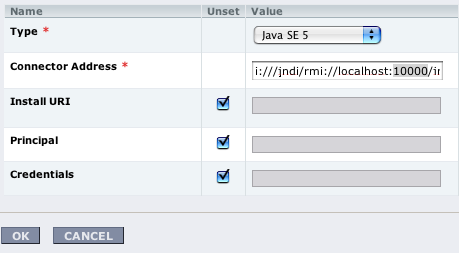
The following screen will show prefilled connection properties - here we need to set port 10000 from above:

JMX_add_3.png


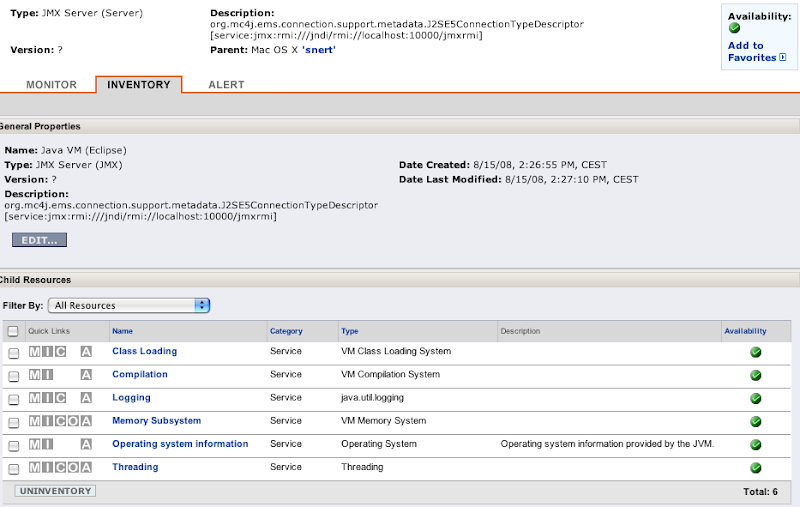
Click on OK and the new Java VM should appear. After some waiting, you will see the inidividual MBeans as you know it from other services in RHQ:

JMX_add_4.png


Technorati Tags:
,


Monday, April 21, 2008

Testing NetBeans (coming from Eclipse)

Inspired by Adam Bien's praise on NetBeans and its Maven support, I was looking at NetBeans again.
NetBeans basically was my first Java IDE, but somehow I never got infected by it and switched to Eclipse relatively soon thereafter.

I downloaded NetBeans 6.0.1 for Mac OS X from the website and started ..

First a little test


So I first tried to import a simple Eclipse project like x2svg with the "Open Project..." and "from existing build file" option, but this wasn't really as I wanted it. Ok, back to the dialog and searching for "from Eclipse project" - nothing. A quick search in help showed that I first have to download and install the respective plugin. That was quick and this time the import worked well.

The next thing that I changed was the key bindings. I am so used to the Eclipse ones, that I don't want to learn new ones. This was equally simple. Just go to preferences and the key bindings section, then choose Eclipse from the drop down. Done (Note to Mac users: Save is on Ctrl-S in that binding, but can be easily changed).

One drawbacks for me is that run/debug options have not been transferred (I am currently trying to improve the XSD parser and have a longish command line).

One irritating thing is that it seemed like the SVN settings also have not been imported. But it turned out that as soon as I specified the location of the svn executable (actually SVN_HOME is the directory where it resides in), svn integration worked as supposed. Interestingly, as I have three source trees in the project, NetBeans is connecting three times to the svn server, while Eclipse uses one connection only on a svn up.

Another thing that is irritating (but which I find a good think after I know what is going on) is the fact that NetBeans is storing its information in a separate folder in the filesystem and uses this folder as default root directory when running an executable, which will make some tests fail. But the I am very happy, that it doesn't just write stuff in my existing project that I would need to remove later.

When I tried to open my two GUI files, I received a (well known) NPE both times - actually I was hoping to get some sort of visual Swing editor instead. The website that took my error report told me that this is probably already resolved and that I should download the latest NB 6.1 milestone (RC2 in my case).

Updating to 6.1 RC 2


The update was painless, and installed a new version next to the 6.0 one in /Applications/NetBeans. Having seen this, I did not expect the plugins that I installed earlier to be present - and I was right.

The NPE was gone too, but I still have no GUI editor - perhaps because NB is just not able to parse GUI elements that were not created using NB?

But from that little test I have to say that I like it much more than when I was looking at it the last time. Now lets go on to something heavier.

Testing with a mavenized project


In RHQ we are using maven a lot. So the next test is to see if the maven support is really as good as Adam is saying.

Checkout from http://svn.rhq-project.org/repos/rhq was painless and NetBeans was asking what project I want to open. I've chosen the root and it now showed me a structure of maven poms, that I could open as project afterwards. This again is very different from how Eclipse is handling things (I mean, RHQ is one project with a bunch of modules). But ok, that import was painless as well.
And then: a build from within NetBeans fails because of some wrong maven version. But this is not fatal for me, as I am used to build from the command line anyway.

Speed


In total NB doesn't feel slow, but with RHQ, auto completion is slower than in Eclipse, the "member view" is slower than the Outline view and the fan of my MacBook is much more active. I can imagine that this comes from the usage of the mavenized project. I will try to import this as Eclipse project as well to see if that changes things to the better.

My friend, the problem view


Eclipse has a problem view that just works. Period. IntelliJ 6 had its issues with it. And now I am finding basically the same in NB 6.1. Perhaps I am missing something obvious - dunno. I have already enabled the "track java dependencies" setting:


(I am not even sure if this setting is supposed to do what I want it to do).

In x2svg I have three source trees src, gui-src and test-src. When I now e.g. rename a method in src (by hand, not via re-factoring), only the errors in the src tree show in the project explorer and in the task list. Even when I have a file from gui-src open and the editor shows the error for that file, it doesn't appear in the task list nor the projects explorer.


When I switch back to the other file, the error will eventually show.

When I then fix the issue in src/ , the error will still show up for the file(s) in gui-src/.

Profiler


Just to mention that as a big plus for NetBeans: it comes with a built in profiler. I don't know how much I'll look at it or even use it, as we are using jProfiler in RHQ, but nevertheless this is a big plus.


Conclusion


NetBeans has gained a lot since I was last looking at it and the Maven integration is really so much better than in Eclipse, which saves me from the pain to always update the .classpath file when we pull in a different library version.

I will keep an eye on NB in the upcoming weeks to see if it could be an alternative to what I now have with Eclispe. But the issue with the problem view / task list, that I mentioned, really is close to a show stopper for me. Perhaps it will just be fixed in NB 6.1 GA.


Wednesday, January 30, 2008

Ignore target folders in eclipse

In Eclipse when you press Command-Shift-R (Open Resource), you end up seeing the same resource a few times -- when it e.g. gets copied into a location in the workspace by your build tool (e.g. maven, ant).

I was looking for a solution for some time now and way playing with working sets for this purpose.
Rob Mayhew obviously has one:
http://robmayhew.com/eclipse-ignore-folder/

Now the "only" thing left to do is to mark those target directories as derived -- after each clean up of those folders.

Luckily there is a project dash in Eclipse that can use javascript to do this.
Someone on the net even wrote the right script

Wednesday, February 14, 2007

Eclipse 3.2.1 performance patch

I was recently complaining that Eclipse is taking a nap after a right-click before displaying the context menu.
When looking for an updated Findbugs plugin the update manager also offered me an update called
"Eclipse Java Development Tools 3.2.1 performance patch (bug: 159325) 1.0.0", which is related to the this bug :
https://bugs.eclipse.org/bugs/show_bug.cgi?id=159325
After installing the Patch, the context menu appears again directly after a right click without any nap.
So this was no problem with the Mac or the Apple VM, but with Eclipse which I only never saw before in Win* times as I was not using such a big workspace together with Eclipse 3.2.1.
According to the bug notes, this is also fixed in 3.3.M2 and - as I understand it - an upcoming 3.2.2 maintenance release.

Saturday, February 10, 2007

A totally subjective comparision of Eclipse 3.2.1 and IDEA 6.0.4

As most of the project I am working on are using IntelliJ IDEA, I thought to give it a try as well. This was not easy, as I am a long term Eclipse and derivates (Rational XDE) user. But on my MacBook, Eclipse is often taking naps when e.g. right clicking in the navigator or package view. I find this behaviour very annoying. And yes, I already have 2GB Ram in the box and I am giving Eclise half a gig for the heap, which doesn't need according to this memory usage bar. IntelliJ just feels much snappier.
This are the differences I found so far:

Eclipse:

  • Better problem view. It shows all errors in the project if I e.g. break a method signature
  • Only one version of Ctrl-Space for autocomplete. I don't want to remember if I need to press alt-ctrl-space or shift-ctrl-space etc. for a given situation
  • Many more plugins
  • Plugins and features are often based on other huge features (e.g. EMF)
  • More than one main window. This is cool when you e.g. are working on transitioning a project from EJB2 to EJB3 or spring. On one monitor you have an Eclipse window with the old code and on the other monitor you have the new code. And on both monitors you can use Overview-view or Package explorer for the class just shown. It also helps when you just want to see a referenced class for the code you are working on. Splitting the window in more tab groups isn't the same.
  • Quick-fixes seem to do a better work for my typos


IDEA:

  • Changelists are an extremely cool feature if you are working at different parts of the project you don't want to commit together
  • Snappier than Eclipse (probably because it does no incremental compilation of the entire code base)
  • cmd-D in Changes View is very handy to see what one has done to a file.
  • Much better code smell detection.
  • Nicer UI look and feel (native Mac, I am not talking about some Motif styles etc.
  • Commit dialog is better arranged (probably due to the changelists). But the "show me the last commit messages" is hidden (cmd-m)
  • If one is programming in an EJB-2 project, Idea is able to follow calls into EJBs, as it knows through ejb-jar.xml which interface classes belong to which EJB. This is extremly helpful. It seems that there is a plugin for Eclipse that can do this as well.
  • The "Scope: Problem" view doesn't really work for me. Probably because IDEA does no incremental compile of the sources. If I change a class in the domain (remove a method) then classes in the GUI that access this method are not displayed as having an error until I open them. Eclipse shows me the GUI-classes directly upon save of the domain class.
  • Struts support is nice
  • Editors for HTML and other 'Web technologies' are better than what you find in a plain eclipse (one can download the WTP stuff to get this as well)


The comparision ends 0:0. If both were free then I'd just change around all the time. Using IDEA for hacking and Eclipse to find errors in the code

What do you think? And yes, there is also NetBeans. But this is not used in our project and I don't want to go through the process of setting up the project structure in it.

Thursday, May 04, 2006

JBoss 4.0.x plugin for Eclipse WTP [updated]

The Eclipse WTP 1.0 only has a server definition for JBoss 3.2.3 which is quite old (3.2.x is at x=8.sp1 and 4.0.x is at x=4).
The webseite at the following link gives an explanation on how to build a definition for 3.2.5
How to build a JBOSS 3.2.5 Server Definition for Eclipse Web Tools Platform
If you want a definition for 4.0.x, you can just follow the document - it is quite detailed.
I have also provided a org.eclipse.jst.server.generic.serverdefinitions_1.0.0.zip that contains a definition for 4.0.3sp1 as well.

Don't forget to run eclipse -clean or you won't see the fruit of your work.
[Update]
The config is still not yet complete. There are a few libraries missing that are needed for starting the server from within eclipse.
When those are included, there is still a problem with parsing of login-config.xml

org.jboss.security.auth.login.ParseException: Encountered "Was expecting one of:
<EOF>
<IDENTIFIER> ...


As the server starts nicely standalone, this seems to be a eclipse related problem.

Wednesday, June 29, 2005

Eclipse 3.1 is out -- and unavailable

Eclipse 3.1 finally has been released. So far for the good news.
The bad news is that the eclipse download page is unavailable (no obvious mirrors). Searching through mirrors like the German one at fht-esslingen do not yet have the complete download as they seem to compete with downloaders around the world for the sparse capacity out of the main eclipse download page.
Perhaps the eclipse foundation should have asked the NetBSD guys how they do it. At NetBSD, when a release is finished, it will be published on the ftp server where only mirrors can pick it up. Later (after a day or two) the directory is opened for the whole public. This worked for years now.
Perhaps with eclipse 3.2 ...

Sunday, June 19, 2005

iX-Eclipse-Conference

Tuesday and Wednesday I have been on the iX-Eclipse-Conference in Heidelberg. Besides giving a talk myself on plugin development, I met some nice people, had fun and did learn quite some new things on Eclipse.
Erich Gamma did a keynote presentation on Eclipse 3.1 news. One of the things I remembered, was his description on how the team made sure that Eclipse 3.1 got faster in respect to 3.0. Basically, they set up a series of unit tests, which measured the runtime of some code and compared it to some reference timing (pseudocode):

public void testFoo()
{
startTimer();
runSomeCode();
endTimer();
commitTimingResultToDatabase();
assertFaster();
}

So this fitted in the framework, one is used to.
More important, they did learn a lesson: It is not enough to measure things, but to have someone (e.g. the community) to kick ass if there is too much red in the results.

Friday, June 03, 2005

Eclipse plugin versions

While preparing my presentation for the upcoming iX-Eclipse-Conference, I also tried 3.1rc1 and thought to switch my example plugin to Java 5.
There currently is a problem when one of the plugins uses Java 2, the export wizard of eclipse doesn't work (See my comment on bug 84767).
But worse than this: there is no environment option to tell a user "this plugin needs Java 5" (98269). There are options for the OS or the windowing system used though.
So the recommendation is either to use a custom build with the right environment set or to restrict plugins to Java 2/JDK 1.4.