Showing posts with label Mac. Show all posts

Friday, November 09, 2018

L2tp IPSec VPN with Mikrotik

I recently discovered the VPN feature on my Android phone and though let me try this to set up a VPN with my home gateway, which is a MikroTik router.

I followed a few guides on the internet, but this just did not work, Android just gave me a short "does not work" message and that's it. So I dropped the ball again.

Now I am going to talk at a conference and I thought, I could set up the scenario on my BigBox at home instead of the Laptop. But how do I expose that? Well, perhaps I should use a VPN. So I googled "MikroTik macOS VPN" and found a few pages that also repeated what I had set up before. I tried again, no luck. Did some packet sniffing on the router. No luck.

And then I got a thought: what if my provider filters udp port 500? Googled around, does not seem so. But it brought me to another idea:

MySetup

If you look at the above setup, you can see that my MikroTik is not directly connected to the internet, but there is a provider router in-between. And this guy also has a firewall and is filtering out ports. In the past I had poked some holes into this (but I log forgot since), but udp port 500 and others needed for IPsec were not forwarded to the MikroTik.

Once I enabled forwarding of these ports, both VPN on macOS and Android started to work like a charm. :-)

One thing I still had to enable was proxy-arp as described in the above guide to be able to reach not only the router, but also my real target host on my LAN.

I have after the good setup played a bit with the configuration (and not put it under version control and everything failed with "no IKEv1 peer config for". Solution was that I had a local address in the /ip ipsec peer and this meant that MikroTik would only allow for connections to that specific IP, which failed.

Another good guides on the topic:

Thursday, October 11, 2018

Solution for: "macOS, Dovecot and setgroups() failed: Too many extra groups"

I upgraded my home server to macOS 10.14 after the upgrade on my laptop went very smooth. Also here the upgrade went smooth, but in the evening I discovered that I did not get any new email.

I started investigating. First I saw that Dovecot did not correctly start because an very old pid file said it has pid 104 and indeed there was a process wit pid 104, so dovecot though that is itself and stopped.

After removing the pid file and restarting Dovecot, it started again and correctly listened on port 993 (imaps). But the imap client still could not login.

Dovecot.log showed a lot of messages

Oct 11 08:10:27 imap(hwr)<12659>: Fatal: setgroups(501) failed: Too many extra groups

Reading the manpage for setgroups() revealed that this call fails when more than NGROUP_MAX (=16) groups are passed. And indeed the user has more than 16 groups:

$ id -G hwr
20 6 12 61 80 98 500 701 702 30 33 100 204 250 395 103 104

Looking at them shows a lot of groups that macOS creates and assigns internally and which one can't (easily) delete

$ id hwr
...
701(com.apple.sharepoint.group.1),702(com.apple.sharepoint.group.2),30(_keytabusers),33(_appstore),100(_lpoperator),204(_developer),250(_analyticsusers),395(com.apple.access_ftp),103(com.apple.access_screensharing-disabled),104(com.apple.access_ssh-disabled)

I wrote to the dovecot mailing list and after an email exchange it turned out that there is a config option already present that can help here to reduce the number of groups passed to setgroups().

So the solution for me is to last_valid_gid = 100 in /usr/local/etc/dovecot/conf.d/10-mail.conf and restart Dovecot.

And now it is again humming along nicely :)

Thursday, March 29, 2018

Small helper for Mac OS/X to open Jira items

In our Kiali project we develop at GitHub, but have the issue tracker on a Jira instance.

Developers put the jira ticket number into commit comments and pull-request headers. To see the Jira item I had so far to go to the Safari url bar and type in the issue link. Sometimes there was a different item already in the history, so I only had to change the key. But all in all that was tedious.

Luckily OS/X has tools like Automator, that allow to create your own services.

I launched Automator and selected to create a service. For details about this see this article.

I then put a "Execute AppleScript" action into the Automator workflow

automator workflow

Saving this whole workflow under "Open in JBoss Jira" then makes the service immediately available

So I can now select a Jira-key and do right-click to get the service

My service in the service context menu

Obviously the service is very much tailored to my need, so I'll put the AppleScript here so you can copy & modify it to your needs.

on run {input, parameters}
	set target to "https://issues.jboss.org/browse/" & (input as string)
	tell application "Safari"
		activate
		tell window 1
			set current tab to (make new tab with properties {URL:target})
		end tell
	end tell
end run

[ UPDATE ]
My colleague Max Andersen pointed out an even better way of doing this by having some helpers turn those keys into links that can directly be clicked.

Wednesday, May 13, 2015

Scripts with multiple actions in Textual5

Some may know Textual as a powerful IRC client on the Mac.

One of the interesting parts (to me) is that Textual allows to extend it via Scripts, that can be written in AppleScript or other scripting languages.

They have an introuction to write Scripts, which I've used to create some simple scripts.

What I always wanted to do it to have scripts that can do multiple things like


/away Gone fishing
/msg I'am out of here
/leave

To set myself into away mode, put a message in the channel and then leave it.

Unfortunately, this seemed impossible.

Yesterday I finally emailed their support and got an answer back that this is pretty simple: just put each command on a new line.

So a potential script could look like this:


on textualcmd(inputData, destinationChannel)

return "
/away Gone for the night
/nick zzZZzz
"
end textualcmd

to set may away mode and also change my nick. It is important to put each of the
command on the very first column of the line, as Textual does not remove leading spaces.

Two helpful links: Textual Command reference, list of IRC commands on Wikipedia.

UPDATE: the "WritingScripts" article meanwhile got updated to better reflect above use case.

Wednesday, July 03, 2013

Using Asciidoc with MarsEdit - first cut

With Asciidoc becoming more popular due to Asciidoctor I started authoring documents in Asciidoc and thought it would be a good idea to use that for my blogging as well (in the long run I may set up my blog in Awestruct, but for now Blogger has to do.

Usually I am using
MarsEdit to write my posts, as it is just convenient for me. MarsEdit now allows to write custom text filters since the recently released version 3.6. There are a few such filters provided like for Markdown or Textile, so that you can write blog posts inside MarsEdit in those markup languages and still be able to post to e.g. Blogger, which requires html.

When I saw the filters announced, I thought, that should be possible with Asciidoc as well.

So basically to achieve this, you need to create a directory

~/Library/Application Support/MarsEdit/TextFilters/Asciidoc_0.0.1

and then create a file Asciidoc.rb with the following content:

#!/usr/bin/ruby

require 'rubygems'
require 'asciidoctor'

input = $stdin.read

puts Asciidoctor.render(input)

Make that file executable and install the AsciiDoctor gem.

Then (re-start) MarsEdit and select Asciidoc as Preview Text filter in the connection settings of the blogger account ( see Mars Edit per Blog Settings ). Then click on the "Posting" tab and click on "Apply preview filter before posting".

Unfortunately I have not yet found out how to include (remote) images

NOTE

Not all AsciiDoc markups make sense, as AsciiDoctor usually uses some CSS, that may not be present on the target blog system. It may be not too hard though to create a special "blogger" backend, that uses
blogger css for that or to tell blogger to accept the AsciiDoctor css files

This screenshot shows MarsEdit with source and preview.

I hope this little post makes sense and encourages people to experiment with it in order to make AsciiDoc a real alternative to


Friday, July 09, 2010

Installing OpenSolaris on Parallels Desktop on Mac

To try some things I wanted to install OpenSolaris 2009.6 on Parallels Desktop on my Mac.

Install of OpenSolaris itself went well, but network was not available.
Searching around the net led to

http://www.opensolaris.com/use/network_administration.pdf
http://blogs.sun.com/lr/entry/opensolaris_in_parallels_vm_on

http://dlc.sun.com/osol/docs/content/2009.06/getstart/parallels.html
and finally

http://kb.parallels.com/de/7060 (or English: http://kb.parallels.com/en/7060)

But still no avail.

It turned out that the script change is almost complete, but is missing
one additional line. Below "Compiling driver ..." it should read


cd $tmpdir/$driver && /usr/ccs/bin/make install > /dev/null


After this change dladm show-phys shows the interface and ifconfig ni0 plumb is able to use it. After a reboot, networking is working :-)

Thursday, May 06, 2010

No wonder Mighty Mouse refused to work

I am for a long time user of a Mighty Mouse (actually 2 of them. And as every user of a Mighty Mouse, I have the issues of the mouse ball being stuck and needing some cleanup.

In the past I've turned the mouse around and rolled it over some issue, which helped more or less. But just now I had the urge to finally open it and really clean it. There are many "how-to"s on the web for this.

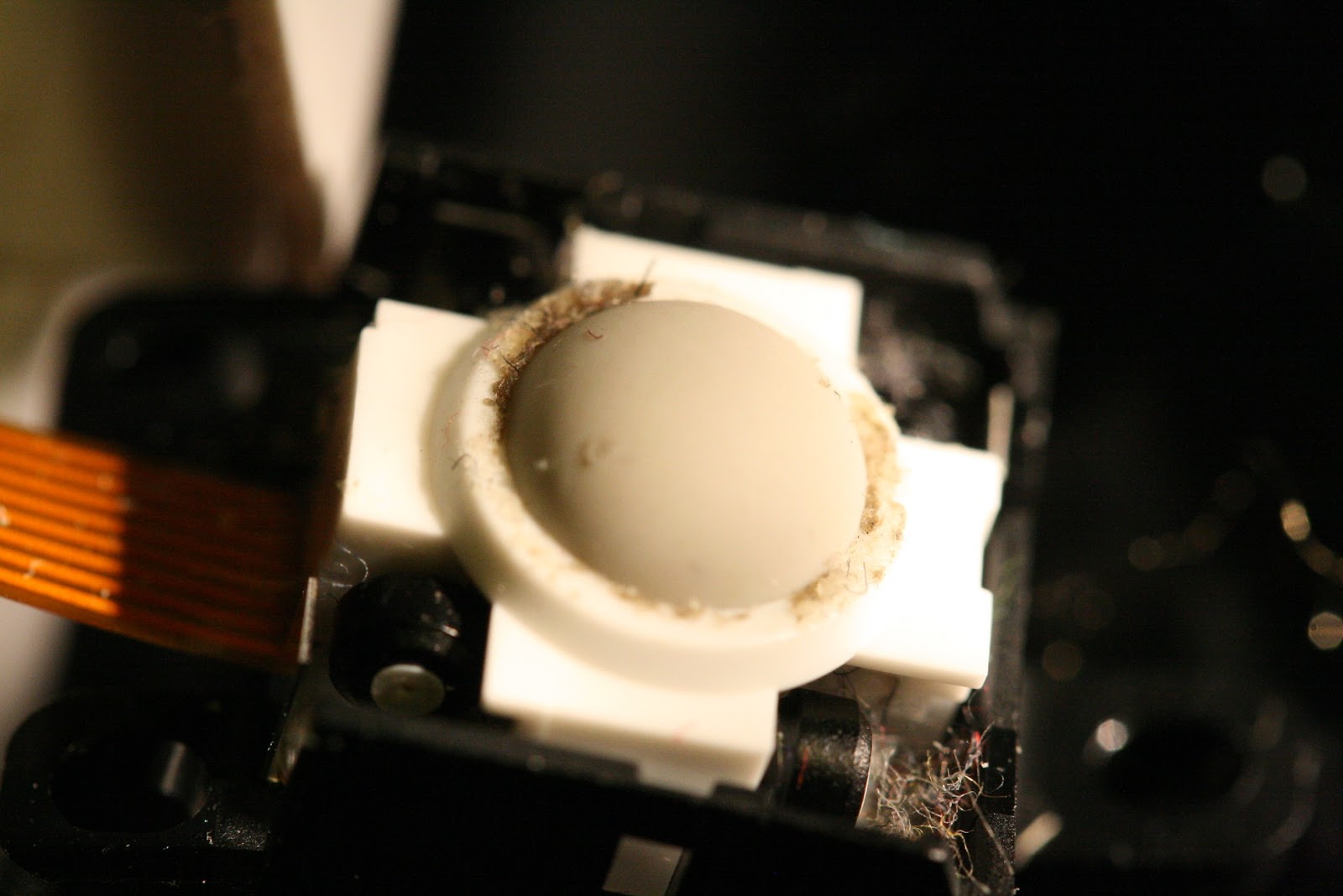
When the mouse was open, it became very obvious why it did not really work well anymore:

IMG_8664.JPG
(click for a larger version)


opening the white cage an removing the ball (which itself was totally clean) revealed more dirt:

IMG_8666.JPG
(click for a larger version)


Cleaning the little rolls was no issue, but putting them back was somewhat harder, as the thicker black rolls are magnetic and would directly attach to a screwdriver.

After assembling everything, the mouse responds well again, so problem solved for the years to come :)

Monday, February 22, 2010

Quote html for MarsEdit


I am using MarsEdit to post my blog entries, which is a nice editor (ok, it could sometimes have a more wysiwig mode, but in total I am happy with it).

One thing that I find often annoying or missing when writing posts is that there is no build in quotation mechanism for '<' in a <pre> block (many of my posts are rather technical and contain XML snippets).

Luckily MarsEdit has AppleScript support, so I wrote this little AppleScript script (actually I copied a good part from the supplied Add Paragraph Tags one):


tell application "MarsEdit"
try
set currentWindow to document 1
on error errorMessage
displayErrorMessage("Can’t add paragraph tags because no post windows are open. This script works on text in the frontmost post window.") of me
return
end try

set currentTextView to selected text in currentWindow
set numChars to number of (characters in currentTextView)
set newBodyText to ""

repeat with i from 1 to numChars

set currentChar to character i in currentTextView

if (currentChar is "<") then
set newBodyText to newBodyText & "&lt;"
else
set newBodyText to newBodyText & currentChar
end if
end repeat

set (selected text in document 1) to newBodyText
end tell


This allows to quote the current selection. Save the script to
~/Library/Application Support/MarsEdit/Scripts/Quote Html.scpt.
It will then be availably in the ApppleScript Menu:

Bildschirmfoto 2010-02-22 um 09.35.54.png


To use it, just select the text and then invoke this Quote Html menu item

Monday, September 14, 2009

Snow Leopard - mixed feelings?

So far Snow Leopard is somewhat disappointing for me:

  • DNS - especially when VPN is on sucks, as SL is sometimes blacklisting very valid hosts all of a sudden. This results in e.g. "The computer is not connected to the internet" messages in Safari for sites like www.google.com (see e.g. here)

  • The upgrade broke Aperture - the upgrade process removed a framework needed by Aperture. For me re-installing /Library/Frameworks/Pluginmanager.framework from a TimeMachine backup worked. (see e.g. here)

  • Older Software like Parallels 2.5 no longer works

  • Nambu 1.2 no longer works (and Nambu 2 is still in closed beta)

  • X-Lite 3 has no sound in/out. Dialing works though. And the beta of X-Lite 4 is not even able to show the preferences.


The biggest item for me is currently the DNS one, as this renders the system more or less unusable.


But then there is at least some good thing about it:


  • The internal VPN now works against Cisco concentrators, which is very nice

  • JDK 1.6 is finally available on 32 bit macs like my 3 years old MacBook


I will update this post, when I see more pros and cons.

Saturday, March 14, 2009

Safari 4 has by far the fastest JavaScript engine on my MacBook

I did just run the Peacekeeper benchmark on my 2.5 years old MacBook (2GHz Core Duo CPU). And here are the results:


Bild 10.png

(Click to enlarge)


So Safari 4 beta is nearly 3.5 times faster than Safari 3.0 and more than 2 two times as fast as the third beta of upcoming Firefox 3.1.

Wednesday, March 04, 2009

Apple heard my prayers: new keyboard

I saw this first on this post: http://elliotth.blogspot.com/2009/03/apple-keyboard.html

Apple has introduced a new keyboard that has a cable and does not have the numeric keypad, making it much smaller than the already existing one with keypad. Actually as it does not need the battery casing, it is even smaller than the wireless one (see e.g. http://www.apple.com/keyboard/ ) and http://store.apple.com/de/product/MB869?mco=NDE4NDE5NQ for the new one in the German Apple store.

And you can immediately see that this is a real Apple product, as it is the same price as the one with keypad :-/

See also Apple Quietly Bumps 15" MacBook Pro Speed, 256GB SSD Option, and New Keyboard


Tuesday, February 24, 2009

Cups error on Leopard: "Missing filter"

Today I was trying to print some files over the printer attached to my mac mini. All I got were pages with errors


ERROR: undefined
OFFENDING COMMAND: csq
I thought first the word processor is sending crap, but after some investigation I found out that the issue is that the generic postscript printer driver is used and not the Laserjet one. Ok, went to preferences and changed the printer to use the Laserjet driver. But still no avail - now the printer even showed up as "not ready" :-(

Looking at /var/log/cups/error_log showed the following:

E [24/Feb/2009:11:02:59 +0100] Unable to execute /Library/Printers/hp/filter/hpPostProcessing.bundle/Contents/MacOS/hpPostProcessing: Operation not permitted
E [24/Feb/2009:11:02:59 +0100] [Job 50] Unable to start filter "/Library/Printers/hp/filter/hpPostProcessing.bundle/Contents/MacOS/hpPostProcessing" - Operation not permitted.

Looking at the two files showed that the x-Bit was missing from them. chmod +x solved this and now the printer is up and running nicely :-)


Thursday, February 19, 2009

MacDeveloper

Are you interested in testing Mac software? You can do so at MacDeveloper.net. I met this site when reporting issues with Trailrunner and the TR autor pointed me to this site, where he has just opened an account.
Meanwhile MD is getting traction and new projects are popping up every week.

And - your time is honored: when you find an issue that is accepted by the developer, you will get points for this. If you have enough points, you will get a rebate on the license or even a license for free -- this depends on the developers and each individual project.


Sunday, January 11, 2009

Tremendous speedup for NSMetadataQuery

In QNote I am using a NSMetadataQuery to allow the user to search for notes. Even with a notes database of a trivial size, it took ages to find notes (it is basically faster to open a terminal and issue a grep command ). And this even when
I have already restricted the searchScope to the directory with the notes in them.

Today I was experimenting with Spotlight again (is there really good documentation for it out there?).

When I add the type of the data I am expecting (plain text), the search gets real quick - exactly as expected. So the code now looks like this:


// Predicate expression for the search string
NSString *predicateFormat = @"kMDItemTextContent like[cd] %@";

// Predicate expression for
NSString *textType = @"kMDItemContentType == 'public.plain-text'";

// If there is something to search for ..
if (_searchKey != nil )
{
// Create the predicate for the key
NSPredicate *p = [NSPredicate predicateWithFormat:predicateFormat,
[_searchKey stringByAppendingString:@"*"]];

// And one for the type
NSPredicate * subPredicate = [NSPredicate predicateWithFormat:
textType];

// Combine the two
p = [NSCompoundPredicate andPredicateWithSubpredicates:
[NSArray arrayWithObjects:p, subPredicate, nil]];

// And set on the query
[_query setPredicate:p];


This simple addition of kMDItemContentType == 'public.plain-text' provides the speedup.
It is unfortunately not clear to me why, as I don't have any other files of other types in the searchScope.

Next thing for me to investigate is not why this spinning thingy (they are called async arrows :) does not stop spinning when spotlight does no longer return results. Perhaps I need to programatically set this and can't rely on the cocoa bindings here - does anyone know?

Saturday, November 15, 2008

Eclipse 3.4, OS X and Subversion - *rant* and success

IntelliJ has SVN support out of the box, Netbeans has SVN support out of the box (by calling the svn binary) - only Eclipse doesn't. For my Eclipse 3.3 install I have a working combination, which is old, but working (and dog slow).

When Ganymede (3.4) was out, I was trying to use it, but failed due to problems installing SVN support.

Yesterday, when looking at the x2svg sources again, I wanted to update the Findbugs plugin just to find out that Eclipse reports my configuration is borked and I can't upgrade findbugs.

I decided to give Ganymede another try and even found a 3.4.1 release. But still no SVN support in it :-( Googling around led me to this post
http://gigamaster.blogspot.com/2008/01/mac-eclipse-europa-svn.html, that gave some hope.
When I went to the upgrade pages in Eclipse, I saw another provider for SVN listed, so I tried it, installed the stuff, but at the end the situation was as before.
Ok, started to install the plugin from tigris (there is a newer version available than the one listed in the blog post).
Then I installed java hl support from mac ports

sh-2.05b# port install subversion-javahlbindings


which also first failed - mostly because some of my installed ports were not up to date.

After all this was done I was finally able to see the SVN section in preferences and the javaHL connector selected.

But wth does the Team context menu not show any option like commit or update? Do I need to add the SVN repository on the SVN repository explorer tab? I did so, but no immediate change.

Ah, there was this one last trick: Go to $workspace/.metadata/ and remove basically everything below it and then re-import all projects again. And all of a sudden I had SVN support in Ganymede. It would probably have been ok to remove just the entry for this one old svn plugin -- but which one is the right one?)

I mean, it is no rocket science, why can't Eclipse get this right out of the box?
I spent over 3 hours to get it to work.
The only good thing is that comparing the on-disk state with a remote version is much faster than what I previously had in 3.3.

Monday, November 03, 2008

YouTube - Macintosh Virus Discovered

This is a way cool video about a virus for Mac OS X:

YouTube - Macintosh Virus Discovered: "http://de.youtube.com/watch?v=0s5wQPz6E3c"


It's probably not suitable for small children :-)

Monday, September 08, 2008

OOO 3.0 RC1 is out - and does not longer immediately crash on Mac

Open Office released the first release candidate of OOO 3.0.

And opposed to the previous betas, it doesn't immediately crash on my mac (Tiger). Well, this sounds too bad, actually, I did not run it for too long and in this time it did not crash at all.
This does not necessarily mean that it is stable, but the previous versions did crash after that time.

UPDATE: I am just editing a 25 pages document without any issues, so it is really usable now.

I am really looking forward to a final version now.

Tuesday, August 26, 2008

RHQ: Compiling the apache snmp module on Mac OS X

RHQ and JBossON allow you to monitor Apache servers through its apache plugin. We have official support via precompiled plugins for Linux and Windows and instructions in the JBossON wiki on how to compile this for other Unixoids. While Mac OS X is a Unixoid (under the covers :-), the compile of the snmp module will not directly succeed.

I want to show here how to do that anyway (I did this against apache 2.0.63 from Macports):


  • First, if not yet done install Macports


  • Then, install libtool from within macports

    sudo port instal libtool

  • Chdir to <JON_AGENT_INSTALL_DIR>/product_connectors/apache-snmp/source

  • Edit the build script (build_apache_snmp.sh) to replace two occurances of libtoolize with glibtoolize

  • edit snmp_common/ucd-snmp/agent/auto_nlist.c
    to include <sys/types.h> : (around line 30)

    #include <sys/types.h>
    #include "asn1.h"
    #include "snmp_api.h"


  • Run the build as indicated on the build page

  • When adding the snmp module config to httpd.conf, specify /var/db for SNMPVar:

    SNMPVar /var/db


Done! :-)
You can now (re)start apache and take it into inventory.

To do this, please specify the root path of the server and the relative path to the htttpd binary, as apache2 from macports is called 'httpd' and not 'apache2', so it won't be correctly detected otherwise.

Wednesday, August 13, 2008

New version of iTunes Remote Control (iTRC)

The latest update of iTunes introduced an incompatibility with iTunes Remote Control, so ITRC did no longer work.
James is fortunately providing an updated version of iTRC that fixes the issues.
You can grab v1.4.1 from iTunes Remote Control.

Thanks James!

Monday, August 04, 2008

NanoMaps for Mobiles | Features | TrailRunner

Wolfgang picked up my "how to" to import the Nano maps into phones like the K610i. You can find the entry here:

NanoMaps for Mobiles | Features | TrailRunner